My blog has been moved to ariya.ofilabs.com.

Monday, June 27, 2011

progressive rendering via tiled backing store

Imagine you have to create a CAD-grade application, e.g. drawing the entire wireframe of a space shuttle or showing the intricacies of 9-layer printed circuit board. Basically something that involves a heavy work to display the result on the screen. On top of that, the application is still expected to perform smoothly in case the user wants to pan/scroll around and zoom in/out.

The usual known trick to achieve this is by employing a backing store, i.e. off-screen buffer that serves as the target for the drawing operations. The user interface then takes the backing store and displays it to the user. Now panning is a matter of translation and zooming is just scaling. The backing store can be updated asynchronously, thus making the user interaction decoupled from the complexity of the rendering.

Moving to a higher ninja level, the backing store can be tiled. Instead of just one giant snapshot of the rendering output, it is broken down to small tiles, say 128x128 pixels. The nice thing is because each tile can be mapped as a texture in the GPU, e.g. via glTexImage2D. Drawing each textured tile is also a (tasty) piece of cake, GL_QUAD with glBindTexture.

Another common use-case for tiling is for online maps. You probably use it every day without realizing it in Google Maps, OpenStreetMap, or other similar services. In this case, the reason is to use tiles is mainly to ease the network aspect. Instead of sending a huge image representing the area seen by the user in the viewport, actually lots of small images are transported and stitched together by the client code in the web browser.

Here is an illustration of the concept. The border of each tile is emphasized. The faded area is what you don't see (outside the viewport). Of course every time you pan and zoom, new fresh tiles are fetched so as to cover the viewport as much as possible.
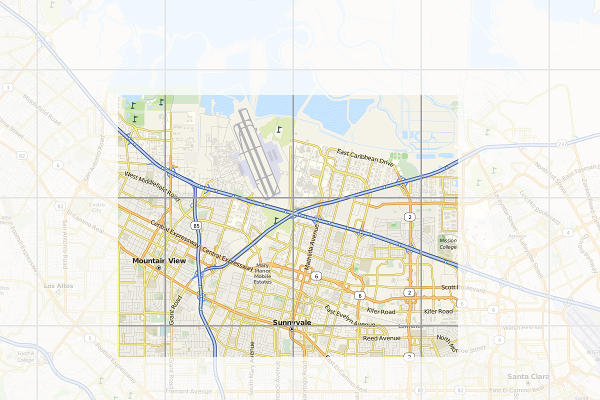
When I started to use the first generation iPhone years ago, I realized that the browser (or rather, its WebKit implementation) uses the very similar trick. Instead of drawing the web page straight to the screen, it uses a tiled backing store. Zooming (via pinching) becomes really cheap, it's a matter of scaling up and down. Flicking is the same case, translating textures does not bother any mobile GPU that much.

Every iOS users know that if you manage to beat the browser and flick fast enough, it tries to catch up and fills the screen as fast as possible but every now and then you'll see some sort of checkerboard pattern. That is actually the placeholder for tiles which are not ready yet.

Since all the geeks out there likely better understand the technique with a piece of code, I'll not waste more paragraphs and present you this week's X2 example: full-featured implementation of tiled backing store in < 500 lines of Qt and C++. You can get the code from the usual X2 git repository, look under graphics/backingstore. When you compile and launch it, use mouse dragging to pan around and mouse wheel to zoom in/out. For the impatient, see the following 50-second screencast (or watch directly on YouTube):

For this particular trick, what you render actually does not matter much (it could be anything). To simplify the code, I do not use WebKit and instead just focus on SVG rendering, in particular of that famous Tiger head. The code should be pretty self-explanatory, especially for the TextureBuffer class, but here is some random note for your pleasure.

At the beginning, every tile is invalid (=0). Every time the program needs to draw a tile, it checks first if the tile is valid or not. If yes, it substitutes it with the checkerboard pattern instead (also called the default texture) and triggers an asynchronous update process. During the update, the program looks for the most important tile which needs to be updated (usually the one closes to the viewport center). What is a tile update? It's the actual rendering of the SVG, clipped exactly to the rectangular bounding box represented by the tile, into a texture.

To show the mix-n-match, I actually use Qt built-in software rasterizer to draw the SVG. That demonstrates that, even though each tile is essentially an OpenGL texture, you are not forced to use OpenGL to prepare the tile itself. This is essentially mixing rasterization done by the CPU with the texture management handled by the GPU.

As I mentioned before, panning is a matter of adjusting the translation offset. Zooming is tricky, it involves scaling up (or down) the textures appropriately. At the same time, it also triggers an asynchronous refresh. The refresh function is nothing but to reset all the tiles to invalid again, which in turns would update each one by one. This gives the following effect (illustrated in the screenshot below). If suddenly you zoom in, you would see pixelated rendering (left). After a certain refresh delay, the tile update makes the rendering crisp again (right).
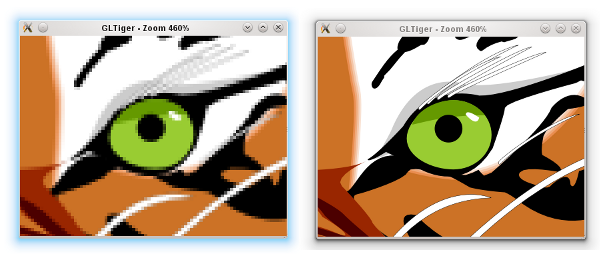
Zooming GLTiger

Because we still need to have the outdated tiles scaled up/down (those pixelated ones), we have to keep them around for a while until the refresh process is completed. This is why there is another texture buffer called the secondary background buffer. Rest assured, when none of the tiles in the background buffer is needed anymore, the buffer is flushed.

If you really want to follow the update and refresh, try to uncomment the debug compiler define. Beside showing the individual tiles better, that flag would also intentionally slows down both update and refresh so your eyes can have more time to trace them.

BTW how would you determine the tile dimension in pixels? Unfortunately this can vary from one hardware to another. Ideally it's not too small because you'd enjoy the penalty of logical overdraw. If it's too large, you might not be progressive enough. Trial and error, that can be your enlightenment process.

Being an example, this program has a lot of simplifications. First of all, usually you want the tile update to take place in a separate thread, and probably updating few tiles at once. With a proper thread affinity, this helps improving the overall perceptive smoothness. Also, in case you know upfront that it does not impact the performance that much, using texture filtering (instead of just GL_NEAREST) for the scaling would give a better zooming illusion.

You might also see that I decided not to use the tile cache approach in the texture buffer. This is again done for simplicity. The continuous pruning of unused textures ensures that we actually don't grow the textures and kill the GPU. If you really insist on the absolutely minimal amount of overdraw and texture usage, then go for a slightly complicated cache system.

Since I'm lazy, the example is using Open GL and quad drawing. If you want to run it on a mobile platform, you have patch it so that it works with Open GL ES. In all cases, converting it to use vertex and texture arrays is likely a wise initial step. While you are there, hook the touch events so you can also do the pinch-to-zoom effect.

If you are brave enough, here is another nice final finish (as suggested by Nicolas of InfoVis and PhiloGL fame). When you zoom in, the tiles in the center are prioritized. However, when you zoom out, the tiles nearby the viewport border should get the first priority, in order to fill the viewport as fast as possible.

Progressive rendering via a tiled backing store is the easiest way to take advantage of graphics processor. It's of course just one form, probably the simplest one, of hardware acceleration.

Friday, June 10, 2011

your webkit port is special (just like every other port)

One of the most often question I got, "Since browser Foo and browser Bar are using the same WebKit engine, why do I get different feature set?".

Let's step aside a bit. Boeing 747, a very popular airliner, uses Pratt & Whitney JT9D engine. So does Airbus A310. Do you expect both planes to have the same flight characteristics? Surely not, there are other bazillion factors which decide how that big piece of metal actually flies. In fact, you would not expect A310-certified pilot to just jump into 747 cockpit and land it.

(Aviation fans, please forgive me if the above analogy is an oversimplification).

WebKit, as a web rendering engine, is designed to use a lot of (semi)abstract interfaces. These interfaces obviously require (surprise) some implementation. Example of such interfaces are network stack, mouse + key handling, thread system, disk access, memory management, graphics pipeline, etc.

What is the popular reference to WebKit is usually Apple's own flavor of WebKit which runs on Mac OS X (the first and the original WebKit library). As you can guess, the various interfaces are implemented using different native libraries on Mac OS X, mostly centered around CoreFoundation. For example, if you specify a flat colored button with specific border radius, well WebKit knows where and how to draw that button. However, the final actual responsibility of drawing the button (as pixels on the user's monitor) falls into CoreGraphics.

With time, WebKit was "ported" into different platform, both desktop and mobile. Such flavor is often called "WebKit port". For Safari Windows, Apple themselves also ported WebKit to run on Windows, using the Windows version of its (limited implementation of) CoreFoundation library.

Beside that, there were many other "ports" as well (see the full list). Via its Chrome browser (and the Chromium sister project), Google has created and continues to maintain its Chromium port. There is also WebKitGtk which is based on Gtk+. Nokia (through Trolltech, which it acquired) maintains the Qt port of WebKit, popular as its QtWebKit module.

(This explains why any beginner scream like "Help! I can't build WebKit on platform FooBar" would likely get an instant reply "Which port are you trying to build?").

Consider QtWebKit, it's even possible (through customized QNetworkAccessManager, thanks to Qt network modularity) to hook a different network backend. This is for example what is being done for KDEWebKit module so that it becomes the Qt port of WebKit which actually uses KDE libraries to access the network.

If we come back to the rounded button example, again the real drawing is carried out in the actual graphics library used by the said WebKit port. Here is a simplified diagram that shows the mapping:

GraphicsContext is the interface. All other code inside WebKit will not "speak" directly to e.g. CoreGraphics on Mac. In the above rounded button example, it will call GraphicsContext's fillRoundedRect() function.

There are various implementation of GraphicsContext, depending on the port. For Qt, you can see how it is done in GraphicsContextQt.cpp file.

Should you know a little bit about graphics, you would realize that there are different methods and algorithms to rasterize a filled rounded rectangle. A certain approach is to convert it to a fill polygon, another one is to scanline-convert the rounded corner directly. A fully GPU-based system may prefer working with tessellated triangle strips, or even with shader. Even the antialiasing level defines the outcome, too.

In short, different graphic stacks with different algorithm may not produce the same result down to the exact pixel colors. It all depends various factors, including the complexity of the drawing itself.

Now the same concept applies to other interfaces. For example, there is no HTTP stack inside WebKit code base. All network-aware code calls specific function to get resources off the server, post some data, etc. However, the actual implementation is in system libraries. Thus, don't bother trying to find SSL code inside WebKit.

This gets us to this question, "If browser X is using WebKit, why it does not have feature Z?". You may be able to deduce the reason. Imagine a certain graphic stack which glues GraphicsContext for that platform does not implement fillRoundedRect() function, what would happen? Yes, your rounded button suddenly becomes a square button.

As a matter of fact, when someone ports WebKit to a new platform, she will need to implement all these interfaces one by one. Until it is complete, of course not everything would work 100% and most likely only the basics are there. That should feel like putting a jet engine into an airframe that can't fly yet.

"Can we have one de-facto graphics stack that powers WebKit so we always have pixel-perfect rendering expectation?" Technically yes, but practically no. In fact, while Boeing and Airbus may buy the same engine from Pratt & Whitney, they may not want to have the exact same landing gears. Everyone of us wants to be special. A certain system wants to use OpenGL ES, squeeze the best performance out of it and doesn't really care if the selling price goes up. Others want to sacrifice the speed, trim the silicon floor and make the device more affordable. More often, you just have to live with diversity.

And if you want to put aside all the differences, two WebKit ports of the same revision share tons of stuff, especially if they use the same JavaScript engine. They will parse HTML and CSS in the same way, produce the same DOM, yield the same render tree, have the same JavaScript host objects, and so on.

Thus, next time someone shouts "there is no two exact WebKit", you know the story behind it.

Monday, June 06, 2011

rectangular gradient

Thorsten Zachmann, from Calligra (and previously KOffice) fame, asked me once on how to draw a different kind of gradient: a rectangular one. While Qt itself has built-in supports for linear, radial, and conical gradient types, apparently for office apps we may need more than that. In short, the goal is creating the following:

It turns out that this is not so difficult at all, about 50 lines of code. Check it out at the usual X2 repository and find it under graphics/rectgradient.

Basically it boils down to a two-step process, as illustrated below. The first one is easy, just create a linear gradient from the center going north and south. The second one is similar, but now we are going east and west and clip it to two triangles. Once we combined both, we get the rectangular gradient.

Have fun with the gradient!

Tuesday, May 31, 2011

on the story of browser names

future = browser?

One of the early graphical web browser that got really popular was Mosaic, developed at National Center for Supercomputing Applications (NCSA). Some folks from the team, along with SGI founder Jim Clark, decided that it's worth a venture and formed a company, originally called Mosaic Communication and then later renamed to Netscape Communication.

Netscape's flagship desktop product was a much more advanced web browser than Mosaic. Jamie Zawinski coined the name "Mozilla", as it was supposed to be Mosaic Killer (Mozilla = Mosaic + Godzilla). At the later stage, the final browser was widely known as Netscape Navigator. For browsing the web, obviously you need a navigator.

Parallel to that, another company called Spyglass licensed the technology from NCSA and produced a web browser, Spyglass Mosaic. It is fun to see the same theme here (probably even slightly coincidental), typical Hollywood movies always portray the naval ship's navigator using his spyglass for some sort of observations.

Then came along Microsoft. It licensed Spyglass Mosaic, called it Internet Explorer, and distributed with Windows. The browser war has just started. I mean of course, the name war. Why would you stop at navigating (and using spyglass) if you can continue exploring?

On the other side of the planet, KDE slowly emerged as the attractive supplement to the otherwise boring Unix desktop. Internet technologies became the centerpiece of the early version of KDE, thus its developers grew a set of applications from e-mail program, newsgroup reader, IRC client, and (surprise) a web browser. There was no free-software-friendly modern and capable web rendering engine back then, thus a bunch of brave young hackers initiated the adventure of (re)writing one, under the name KHTML (which was itself a replacement of the original attempt, khtmlw).

From this KDE camp, the ultimate web browser (which actually could serve other tasks as well, e.g. file manager and document viewer) was popular as Konqueror (indeed, those were the days where KDE stuff was named K-this or K-that). History showed how Age of Discovery was not about navigation and exploration only. After all, who would not want to repeat the glory of "I came, I saw, I conquered"?

When Apple decided that it must give the best browsing experience for Mac (and could not just rely on Microsoft for its Internet Explorer), they took KHTML, ported it to Mac, improved it, and later released it as an open-source project called WebKit. Apple's proprietary web browser, which is powered by WebKit (till today), was announced by Steve Jobs as Safari. Already conquered a land? Might as well enjoy it with a little bit of safari and collect exotic pictures. Shall we?

Just like in your favorite comic books, the world is however multiverse. Netscape lost the browser war, Mozilla became an open-source project and its Firefox browser (formerly Firebird, and formerly Phoenix) remains as the icon of freedom, independence, and community. Opera, originally a Telenor research project, was something that came all the way from Norway, has loyal followers and remains dominant in the embedded space. Google even joined the fun and launched WebKit-based Chrome (and Chromium). All these three are excellent web browsers, they just don't have the names which fit the story of navigation, exploration, and so on.

As the closing, here is a side twist. In its early WebKit days, how did Apple engineers name the code branch of its ported Konqueror's KHTML? Alexander.

Sunday, May 29, 2011

meego conf 2011 impressions

meegoconf 2011

It's a mixed feeling. Personally it was (always) fun to meet my former coworkers from Qt, Nokia and other KDE folks and catch up and exchange tech gossips. I am also excited to get to know MeeGo team from Intel side as well. The conference itself is professionally organized. The Hacker Lounge idea is perfect, a basement to hang out 24 hours with free cold drinks, lots of games (from fussball to pingpong), superfast and reliable WiFi, and of course a bunch of comfy couches. Hyatt Regency itself proves to be a really really nice venue from such a developer conference.

The three-day program was packed with tons of sessions, anything from Qt 5, Wayland, Scene Graph, Media and IVI, and various other BoFs. Lots of exciting new technologies coming to the next version of MeeGo! Oh BTW, the releases will be every 6 months, expect MeeGo 1.3 in October 2011, along with its experimental Wayland support.

From the device-give-away perspective, Intel threw a lot of ExoPC tablets (flashed with MeeGo 1.2 preview), as part of its AppUp program. I got one for a while, it's really easy to port your existing Qt apps using its SDK (but that's a separate blog post).

But that's about it. LG was supposed to showcase its MeeGo-based LG GW990 (based on Intel Moorestown). There was even rumor that LG has also a tablet product, instead of only just a smartphone. And of course Nokia has its own N9 phone in the pipeline. None of this happened.

When I remember back at Maemo Summit 2009 in Amsterdam, there was an accelerated momentum just because Nokia gave N900 to everyone. It was a top-of-the-line phone at that time, I still even use it for various demos. Back then I was still with Nokia and after all these years, it's not funny to see that everyone is still using it. It's fine and dandy to have millions of cars using MeeGo for its infotainment, smart TVs based on MeeGo, and so on. A refresh in this smartphone party however would have made a much more dramatic impact with respect to the momentum in the development community.

Seems I still need to wait until I can use a MeeGo phone as my primary phone. Meanwhile, I'll stick with ExoPC tablet to learn various bits of MeeGo. And hopefully nothing would exhaust my patience.

Sunday, May 22, 2011

meego conf 2011

It's MeeGo time! 2011 conference will be held in Hyatt Regency, San Francisco.

The complete program has been published. For topics related to Qt (among others), check what Thiago listed. In particular, of course yours truly be there, talking about Hybrid Apps (Native + Web) using WebKit.

If you will be around, see you there!

Thursday, April 28, 2011

tango papa echo, charlie golf kilo

journey

Currently stranded at TPE. Few minutes before leaving SFO I managed to tag 1.1.0 release for PhantomJS (lesson learned: never attempt a release few hours before boarding). Thanks to Ivan and Alessandro, few source tarballs and binaries are now ready.

It's been hectic days. 2011 WebKit Contributors Meeting was just over, it was fantastic and I got to meet and talk to a lot of WebKit rockstars. Parallel to that, my fellow brave Sencha lads finally unleashed The Quattro!

Next stop, also the final destination: CGK. Bracing for the impact of reverse culture shock...

Saturday, April 23, 2011

camp kde 2011

Camp KDE 2011 was a fabulous experience. First of all, there is definitely something with me and Camp KDE. The previous one was in San Diego and at that time I was there working for Qualcomm. This year it is San Francisco, right after I moved to the Bay Area.

Videos of the sessions have been published. I contributed two talks there, one is about the (usual) graphics stuff with Qt (video, slides). The other one is a series of demos of web technologies (video, slides).

There are some interview videos as well. If you watch Wade and me, you can spot a little guy there. Pay attention to his shirt :)

The venue can't be better, it's in the center of Japantown. Even better, the weekend after is the Cherry Blossom Festival.

cherry blossoms

Since I don't live in a big city anymore, it's also fascinating to be able to spot a cozy cafe right between all the big buildings. Right in Japantown, we found YakiniQ which serves a must-try sweet potato latte!

latte & croissant

All in all, it was a blast for me. Beside catching up with the people I met before, finally I got to meet folks I only know through our online interaction.

Kudos to the Camp KDE organizers! See you in 2012.

Saturday, March 19, 2011

camp kde in 2 weeks

My first Camp KDE experience was when it was held in San Diego, which was also interesting since at that time, I just moved there.

Just like the planets align themselves, apparent my move to the Bay Area is matched with this year Camp KDE in San Francisco. This time, it is co-located with Linux Foundation Collaboration Summit. For more info, just check the official site: camp.kde.org.

The schedule for the tracks has been finalized, there will be various talks around KDE on Mobile, PIM, and of course Qt. I myself will have two presentations: Introduction to QtWebKit and Efficient Graphics with Qt: Beautiful and Blazing Fast.

See you there!

Saturday, March 12, 2011

SenchaCon 2010

At the last successful, sold-out Sencha Conference 2010, I did two introductory talks about JavaScript and WebKit, mainly targeted for web application developers. Since a few weeks ago, the videos for these talks have been available for you to watch.

JavaScript Engines: Under the Hood is 10,000-foot overview on how a typical JavaScript engine works. Watch it below or at vimeo.com/18783283, with the accompanying slides at http://slidesha.re/gGx9aA.

The other talk Compiling and Optimizing Your Own Browser with WebKit (vimeo.com/18780399 for the video, http://slidesha.re/fPSvXX for the slide deck), mostly showing few tricks you can leverage to understand how your web applications work. For example, by using QtWebKit and capturing all the drawing commands and the corresponding timestamp, it is very easy to have a slow-motion rendering of your web page. As I showed it in the talk, it is even possible to go back in time, i.e. rendering your web page backwards.

Many other videos from SenchaCon 2010 have been published as well. Make sure you check them out.

Enjoy!

Friday, March 11, 2011

PhantomJS meets CoffeeScript

I did something related to CoffeeScript before, namely simple command-line compiler. For those who are not aware of CoffeeScript, it's basically (from Wikipedia) JavaScript with "syntactic sugar inspired by Ruby and Python".

On the hand, surprisingly PhantomJS generates more interest than I ever imagined before (with over 240 watching its repository), prompting me not to abandon it too soon :) In fact, I decided to dump my tought on its roadmap since more and more people are willing to help.

My secret feature, which is not secret anymore, for the upcoming 1.1 release is to incorporate the CoffeeScript compiler so that PhantomJS scripts can be written in CoffeeScript. Since the intention of PhantomJS is for various scripting purpose utilizing headless QtWebKit, this is a perfect match.

Gone are the curly braces...

Tuesday, February 22, 2011

vim: fast file navigation with Command-T

Judging from the hits, my blog post on lightning-fast project navigation in vim seems to be still popular. While the Project script is still my favorite these days, especially when dealing with hundreds of files, let me show you here another gem: Command-T script.

Similar to Command-T in TextMate, basically this Command-T script allows quick and incremental search for files. This works very well. The official site for Command-T has several good screencasts which demonstrate how to install and set it up.

Manual installation is fairly simple. In fact, if you use Janus (which what I strongly do recommend these days for vim lovers), you are already set.

Command-T's documentation is quite extensive, make sure you read it. For the impatient, here are three important tidbits.

(1) Command-T requires vim with Ruby support. One way to find this is:

vim --version | grep '\+ruby'

(2) The default binding is Leader-t. For MacVim (or other GUI-based vim on Mac) and you'd like to have it on your Command-t (or D-T, in vim's terminology), just insert the following in your .vimrc:

  if has("gui_macvim")
    macmenu &File.New\ Tab key=
    map  :CommandT
  endif

(3) If you like to open the selected file in a new tab, hit Ctrl+T instead of just Enter.

One side note: if you have MacVim but don't have the mvim shortcut, add this to your .profile (or .bash_profile):

alias mvim='/Applications/MacVim.app/Contents/MacOS/Vim -g'

This way, you can launch MacVim from terminal, e.g. mvim code.js.

And in case you still want to use TextMate, why don't you check out TextMate2 instead?