My blog has been moved to ariya.ofilabs.com.
Showing posts with label tip. Show all posts

Monday, June 27, 2011

progressive rendering via tiled backing store

Imagine you have to create a CAD-grade application, e.g. drawing the entire wireframe of a space shuttle or showing the intricacies of 9-layer printed circuit board. Basically something that involves a heavy work to display the result on the screen. On top of that, the application is still expected to perform smoothly in case the user wants to pan/scroll around and zoom in/out.

The usual known trick to achieve this is by employing a backing store, i.e. off-screen buffer that serves as the target for the drawing operations. The user interface then takes the backing store and displays it to the user. Now panning is a matter of translation and zooming is just scaling. The backing store can be updated asynchronously, thus making the user interaction decoupled from the complexity of the rendering.

Moving to a higher ninja level, the backing store can be tiled. Instead of just one giant snapshot of the rendering output, it is broken down to small tiles, say 128x128 pixels. The nice thing is because each tile can be mapped as a texture in the GPU, e.g. via glTexImage2D. Drawing each textured tile is also a (tasty) piece of cake, GL_QUAD with glBindTexture.

Another common use-case for tiling is for online maps. You probably use it every day without realizing it in Google Maps, OpenStreetMap, or other similar services. In this case, the reason is to use tiles is mainly to ease the network aspect. Instead of sending a huge image representing the area seen by the user in the viewport, actually lots of small images are transported and stitched together by the client code in the web browser.

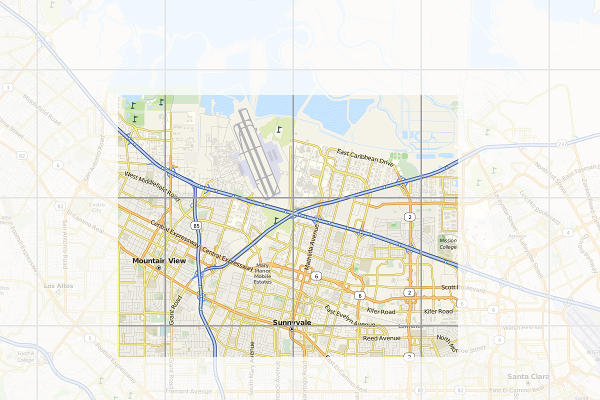
Here is an illustration of the concept. The border of each tile is emphasized. The faded area is what you don't see (outside the viewport). Of course every time you pan and zoom, new fresh tiles are fetched so as to cover the viewport as much as possible.
When I started to use the first generation iPhone years ago, I realized that the browser (or rather, its WebKit implementation) uses the very similar trick. Instead of drawing the web page straight to the screen, it uses a tiled backing store. Zooming (via pinching) becomes really cheap, it's a matter of scaling up and down. Flicking is the same case, translating textures does not bother any mobile GPU that much.

Every iOS users know that if you manage to beat the browser and flick fast enough, it tries to catch up and fills the screen as fast as possible but every now and then you'll see some sort of checkerboard pattern. That is actually the placeholder for tiles which are not ready yet.

Since all the geeks out there likely better understand the technique with a piece of code, I'll not waste more paragraphs and present you this week's X2 example: full-featured implementation of tiled backing store in < 500 lines of Qt and C++. You can get the code from the usual X2 git repository, look under graphics/backingstore. When you compile and launch it, use mouse dragging to pan around and mouse wheel to zoom in/out. For the impatient, see the following 50-second screencast (or watch directly on YouTube):

For this particular trick, what you render actually does not matter much (it could be anything). To simplify the code, I do not use WebKit and instead just focus on SVG rendering, in particular of that famous Tiger head. The code should be pretty self-explanatory, especially for the TextureBuffer class, but here is some random note for your pleasure.

At the beginning, every tile is invalid (=0). Every time the program needs to draw a tile, it checks first if the tile is valid or not. If yes, it substitutes it with the checkerboard pattern instead (also called the default texture) and triggers an asynchronous update process. During the update, the program looks for the most important tile which needs to be updated (usually the one closes to the viewport center). What is a tile update? It's the actual rendering of the SVG, clipped exactly to the rectangular bounding box represented by the tile, into a texture.

To show the mix-n-match, I actually use Qt built-in software rasterizer to draw the SVG. That demonstrates that, even though each tile is essentially an OpenGL texture, you are not forced to use OpenGL to prepare the tile itself. This is essentially mixing rasterization done by the CPU with the texture management handled by the GPU.

As I mentioned before, panning is a matter of adjusting the translation offset. Zooming is tricky, it involves scaling up (or down) the textures appropriately. At the same time, it also triggers an asynchronous refresh. The refresh function is nothing but to reset all the tiles to invalid again, which in turns would update each one by one. This gives the following effect (illustrated in the screenshot below). If suddenly you zoom in, you would see pixelated rendering (left). After a certain refresh delay, the tile update makes the rendering crisp again (right).
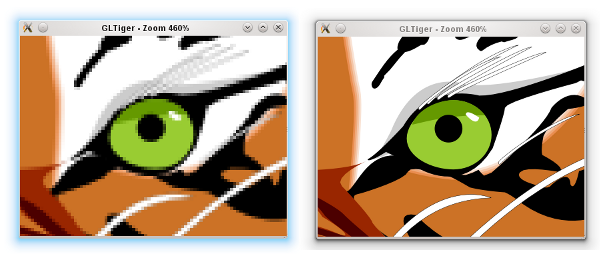
Zooming GLTiger

Because we still need to have the outdated tiles scaled up/down (those pixelated ones), we have to keep them around for a while until the refresh process is completed. This is why there is another texture buffer called the secondary background buffer. Rest assured, when none of the tiles in the background buffer is needed anymore, the buffer is flushed.

If you really want to follow the update and refresh, try to uncomment the debug compiler define. Beside showing the individual tiles better, that flag would also intentionally slows down both update and refresh so your eyes can have more time to trace them.

BTW how would you determine the tile dimension in pixels? Unfortunately this can vary from one hardware to another. Ideally it's not too small because you'd enjoy the penalty of logical overdraw. If it's too large, you might not be progressive enough. Trial and error, that can be your enlightenment process.

Being an example, this program has a lot of simplifications. First of all, usually you want the tile update to take place in a separate thread, and probably updating few tiles at once. With a proper thread affinity, this helps improving the overall perceptive smoothness. Also, in case you know upfront that it does not impact the performance that much, using texture filtering (instead of just GL_NEAREST) for the scaling would give a better zooming illusion.

You might also see that I decided not to use the tile cache approach in the texture buffer. This is again done for simplicity. The continuous pruning of unused textures ensures that we actually don't grow the textures and kill the GPU. If you really insist on the absolutely minimal amount of overdraw and texture usage, then go for a slightly complicated cache system.

Since I'm lazy, the example is using Open GL and quad drawing. If you want to run it on a mobile platform, you have patch it so that it works with Open GL ES. In all cases, converting it to use vertex and texture arrays is likely a wise initial step. While you are there, hook the touch events so you can also do the pinch-to-zoom effect.

If you are brave enough, here is another nice final finish (as suggested by Nicolas of InfoVis and PhiloGL fame). When you zoom in, the tiles in the center are prioritized. However, when you zoom out, the tiles nearby the viewport border should get the first priority, in order to fill the viewport as fast as possible.

Progressive rendering via a tiled backing store is the easiest way to take advantage of graphics processor. It's of course just one form, probably the simplest one, of hardware acceleration.

Friday, June 10, 2011

your webkit port is special (just like every other port)

One of the most often question I got, "Since browser Foo and browser Bar are using the same WebKit engine, why do I get different feature set?".

Let's step aside a bit. Boeing 747, a very popular airliner, uses Pratt & Whitney JT9D engine. So does Airbus A310. Do you expect both planes to have the same flight characteristics? Surely not, there are other bazillion factors which decide how that big piece of metal actually flies. In fact, you would not expect A310-certified pilot to just jump into 747 cockpit and land it.

(Aviation fans, please forgive me if the above analogy is an oversimplification).

WebKit, as a web rendering engine, is designed to use a lot of (semi)abstract interfaces. These interfaces obviously require (surprise) some implementation. Example of such interfaces are network stack, mouse + key handling, thread system, disk access, memory management, graphics pipeline, etc.

What is the popular reference to WebKit is usually Apple's own flavor of WebKit which runs on Mac OS X (the first and the original WebKit library). As you can guess, the various interfaces are implemented using different native libraries on Mac OS X, mostly centered around CoreFoundation. For example, if you specify a flat colored button with specific border radius, well WebKit knows where and how to draw that button. However, the final actual responsibility of drawing the button (as pixels on the user's monitor) falls into CoreGraphics.

With time, WebKit was "ported" into different platform, both desktop and mobile. Such flavor is often called "WebKit port". For Safari Windows, Apple themselves also ported WebKit to run on Windows, using the Windows version of its (limited implementation of) CoreFoundation library.

Beside that, there were many other "ports" as well (see the full list). Via its Chrome browser (and the Chromium sister project), Google has created and continues to maintain its Chromium port. There is also WebKitGtk which is based on Gtk+. Nokia (through Trolltech, which it acquired) maintains the Qt port of WebKit, popular as its QtWebKit module.

(This explains why any beginner scream like "Help! I can't build WebKit on platform FooBar" would likely get an instant reply "Which port are you trying to build?").

Consider QtWebKit, it's even possible (through customized QNetworkAccessManager, thanks to Qt network modularity) to hook a different network backend. This is for example what is being done for KDEWebKit module so that it becomes the Qt port of WebKit which actually uses KDE libraries to access the network.

If we come back to the rounded button example, again the real drawing is carried out in the actual graphics library used by the said WebKit port. Here is a simplified diagram that shows the mapping:

GraphicsContext is the interface. All other code inside WebKit will not "speak" directly to e.g. CoreGraphics on Mac. In the above rounded button example, it will call GraphicsContext's fillRoundedRect() function.

There are various implementation of GraphicsContext, depending on the port. For Qt, you can see how it is done in GraphicsContextQt.cpp file.

Should you know a little bit about graphics, you would realize that there are different methods and algorithms to rasterize a filled rounded rectangle. A certain approach is to convert it to a fill polygon, another one is to scanline-convert the rounded corner directly. A fully GPU-based system may prefer working with tessellated triangle strips, or even with shader. Even the antialiasing level defines the outcome, too.

In short, different graphic stacks with different algorithm may not produce the same result down to the exact pixel colors. It all depends various factors, including the complexity of the drawing itself.

Now the same concept applies to other interfaces. For example, there is no HTTP stack inside WebKit code base. All network-aware code calls specific function to get resources off the server, post some data, etc. However, the actual implementation is in system libraries. Thus, don't bother trying to find SSL code inside WebKit.

This gets us to this question, "If browser X is using WebKit, why it does not have feature Z?". You may be able to deduce the reason. Imagine a certain graphic stack which glues GraphicsContext for that platform does not implement fillRoundedRect() function, what would happen? Yes, your rounded button suddenly becomes a square button.

As a matter of fact, when someone ports WebKit to a new platform, she will need to implement all these interfaces one by one. Until it is complete, of course not everything would work 100% and most likely only the basics are there. That should feel like putting a jet engine into an airframe that can't fly yet.

"Can we have one de-facto graphics stack that powers WebKit so we always have pixel-perfect rendering expectation?" Technically yes, but practically no. In fact, while Boeing and Airbus may buy the same engine from Pratt & Whitney, they may not want to have the exact same landing gears. Everyone of us wants to be special. A certain system wants to use OpenGL ES, squeeze the best performance out of it and doesn't really care if the selling price goes up. Others want to sacrifice the speed, trim the silicon floor and make the device more affordable. More often, you just have to live with diversity.

And if you want to put aside all the differences, two WebKit ports of the same revision share tons of stuff, especially if they use the same JavaScript engine. They will parse HTML and CSS in the same way, produce the same DOM, yield the same render tree, have the same JavaScript host objects, and so on.

Thus, next time someone shouts "there is no two exact WebKit", you know the story behind it.

Sunday, May 29, 2011

meego conf 2011 impressions

meegoconf 2011

It's a mixed feeling. Personally it was (always) fun to meet my former coworkers from Qt, Nokia and other KDE folks and catch up and exchange tech gossips. I am also excited to get to know MeeGo team from Intel side as well. The conference itself is professionally organized. The Hacker Lounge idea is perfect, a basement to hang out 24 hours with free cold drinks, lots of games (from fussball to pingpong), superfast and reliable WiFi, and of course a bunch of comfy couches. Hyatt Regency itself proves to be a really really nice venue from such a developer conference.

The three-day program was packed with tons of sessions, anything from Qt 5, Wayland, Scene Graph, Media and IVI, and various other BoFs. Lots of exciting new technologies coming to the next version of MeeGo! Oh BTW, the releases will be every 6 months, expect MeeGo 1.3 in October 2011, along with its experimental Wayland support.

From the device-give-away perspective, Intel threw a lot of ExoPC tablets (flashed with MeeGo 1.2 preview), as part of its AppUp program. I got one for a while, it's really easy to port your existing Qt apps using its SDK (but that's a separate blog post).

But that's about it. LG was supposed to showcase its MeeGo-based LG GW990 (based on Intel Moorestown). There was even rumor that LG has also a tablet product, instead of only just a smartphone. And of course Nokia has its own N9 phone in the pipeline. None of this happened.

When I remember back at Maemo Summit 2009 in Amsterdam, there was an accelerated momentum just because Nokia gave N900 to everyone. It was a top-of-the-line phone at that time, I still even use it for various demos. Back then I was still with Nokia and after all these years, it's not funny to see that everyone is still using it. It's fine and dandy to have millions of cars using MeeGo for its infotainment, smart TVs based on MeeGo, and so on. A refresh in this smartphone party however would have made a much more dramatic impact with respect to the momentum in the development community.

Seems I still need to wait until I can use a MeeGo phone as my primary phone. Meanwhile, I'll stick with ExoPC tablet to learn various bits of MeeGo. And hopefully nothing would exhaust my patience.

Sunday, May 22, 2011

meego conf 2011

It's MeeGo time! 2011 conference will be held in Hyatt Regency, San Francisco.

The complete program has been published. For topics related to Qt (among others), check what Thiago listed. In particular, of course yours truly be there, talking about Hybrid Apps (Native + Web) using WebKit.

If you will be around, see you there!

Tuesday, February 22, 2011

vim: fast file navigation with Command-T

Judging from the hits, my blog post on lightning-fast project navigation in vim seems to be still popular. While the Project script is still my favorite these days, especially when dealing with hundreds of files, let me show you here another gem: Command-T script.

Similar to Command-T in TextMate, basically this Command-T script allows quick and incremental search for files. This works very well. The official site for Command-T has several good screencasts which demonstrate how to install and set it up.

Manual installation is fairly simple. In fact, if you use Janus (which what I strongly do recommend these days for vim lovers), you are already set.

Command-T's documentation is quite extensive, make sure you read it. For the impatient, here are three important tidbits.

(1) Command-T requires vim with Ruby support. One way to find this is:

vim --version | grep '\+ruby'

(2) The default binding is Leader-t. For MacVim (or other GUI-based vim on Mac) and you'd like to have it on your Command-t (or D-T, in vim's terminology), just insert the following in your .vimrc:

  if has("gui_macvim")
    macmenu &File.New\ Tab key=
    map  :CommandT
  endif

(3) If you like to open the selected file in a new tab, hit Ctrl+T instead of just Enter.

One side note: if you have MacVim but don't have the mvim shortcut, add this to your .profile (or .bash_profile):

alias mvim='/Applications/MacVim.app/Contents/MacOS/Vim -g'

This way, you can launch MacVim from terminal, e.g. mvim code.js.

And in case you still want to use TextMate, why don't you check out TextMate2 instead?

Saturday, January 08, 2011

command line CoffeeScript

CoffeeScript seems to be picking up some momentum these days. No doubt, it is very valuable to help writing cleaner code.

The command-line choices to run CoffeeScript compiler right now are either using Rhino (jcoffeescript) or using NodeJS. While I love NodeJS, seems that it is an overkill to require the entire NodeJS stack/infrastructure/package manager to invoke CoffeeScript compiler.

The solution is to use V8, the powerful JavaScript engine, with a little binding so that it can access file system. This is exactly filejs, something I have shown before, e.g. to invoke JSLint from command line.

Combining filejs and CoffeeScript is terribly easy. Just follow these steps.

Note: filejs does not support Windows yet. Sorry.

First of all, if you have not done it, build filejs. Go to the X2 repository, it is under the javascript/filejs folder. Open the included README.TXT and follow the instructions on how to build V8 and filejs.

After you build it, copy both filejs executable and coffee.js to somewhere in your PATH. Usually I stash that kind of stuff in ~/bin and ensure that ~/bin is in my PATH.

Now get coffee-script.js (the CoffeeScript to JavaScript compiler) and store it somewhere, e.g. ~/bin again.

Create a new file called coffee, which has the following one-line content:

filejs ~/bin/coffee.js $1

Make that file executable and then save it to ~/bin (again).

Open coffee.js and modify the value of the compiler variable to point to your coffee-script.js. Note: this must use the absolute path name.

Now you can do the following:

coffee hello.coffee

If hello.coffee is your script written in CoffeeScript, the converted JavaScript version will be dumped to the standard output.

Feel free to tweak coffee.js so that it understands and passes various CoffeeScript compiler options!

Fun, isn't it?

Saturday, January 01, 2011

X2 from Ofi Labs: wrap-up 2010

X2It got started when I needed a new home for my examples. It has even a nice logo.

sensor

accelerometer viewer for Maemo 5 (Nokia N900).

bouncing ball, where the gravity affects the movement of the ball.

box of marbles, where the gravity affects a bunch of colored marbles.

combining accelerometer and network to do inter-device marbles transfer.

motion and orientation for web applications.

web-based version of marble box.

widgets

morphing clock, where the transition between the digital and analog version is a kind of morphing effect.

qpalette viewer so you know which color is which one.

graphics

fast approximation of Gaussian blur to create a blurry drop shadow.

command-line capture tool to save maps from OpenStreetMap, MapQuest and Ovi Maps.

simple tool to list all chunks inside a PNG image.

webkit & javascript

file processing, including using jslint, in command-line using JavaScript.

play Canvas-based game as normal desktop app.

offline, command line beautifier for JavaScript code, utilizing Qt Script.

another variant of the beautifier, this time using V8.

minimalistic editing widget for JavaScript code, with custom syntax highlighting.

white background is boring? just try some color inverted web pages.

detect the closest link to ease following it on a touch device.

Canvas pixel manipulation for plasma effect.

network

simple proxy server for HTTP, in 100 lines.

tracenet: trap all network requests+replies to show them with Speed Tracer.

filterproxy: another variant of the proxy server with added URL filtering feature.

Wednesday, November 10, 2010

V8 + jslint + vim

Usually, you would want to use scripting solution, e.g. Perl/Python/whatever, to manipulate file contents. Somehow, it's also fun to use JavaScript instead. After I did the V8-based jsbeautify, I was doing V8-based jslint as well. Then I realized, let's just extend it to be generic. With API loosely modelled after CommonJS, filejs was born. Find it in the usual X2 repository under the javascript/filejs. There are two examples so far, ROT-13 and line counter. If you write more examples, feel free to pass them to me!

Of course, the twist is: use filejs to drive a command-line jslint. This is one way to do it. First build filejs (follow the instructions in the included README), then place the executable in your PATH. Create a simple shell script, which contains one line filejs /path/to/filejs/jslint.js $1 and make it executable. That's it! If you also store this shell script in your PATH, then you just need to run:

jslint source-code.js

If you use vim, jslint can be combined with Quickfix. First of all, associate *.js with the tool by putting this line in your personal .vimrc:

au FileType javascript set makeprg=jslint\ %

Now open a JavaScript file and run :make (or whatever shortcut you map this into), which will launch jslint with the current file. After a while, use :cope to open the quickfix little window, move up and down, and press Enter to bring you back to the main editor and set the cursor at the specified problem. Use standard window navigation, e.g. Ctrl+W W to switch to quickfix pane again. Check the quickfix documentation for details. All in all, you may want to map mostly used commands to some shortcuts for faster access.

Note that since this is dynamic JavaScript, rather than matching errorformat, technically I just tweaked the tool to spit something similar to what a C/C++ compiler would do. Also, if you need different jslint options, simply edit the invocation to suit your needs.

It's been a while since I blogged about vim. The last one was about the project plugin, which is surprisingly still quite popular. Hopefully this one also teaches you a trick or two, especially if you work a lot with JavaScript code.

Note 1: It does not work on Windows yet. No idea if I would have the time to do it, patch is welcomed.

Note 2: This is not a replacement for NodeJS, nor would it grow to include more functions.

Note 3: For the sake of completeness, let me mention that there are already other countless solutions for command-line jslint (using Rhino, SpiderMonkey, JSC, etc), even with vim integration.

Wednesday, October 13, 2010

on JavaScript engines

If you are using a modern browser, likely you already have the (arguably) most widely deployed scripting environment: JavaScript engine (or ECMAScript, if you insist). There are many things you can do with it (just look at tons of cool web apps out there). However, since it is contained in the browser, there are also things the embedded JavaScript engine can not do for you.

If you are using KDE, you also have two excellent JavaScript engines: KJS and Qt Script. You can embed either of them (i.e. KJSEmbed) and make your application scriptable. In a not-so-strange twist, they both relate (distantly) to each other via JavaScriptCore, WebKit's default JavaScript engine, because long time ago Apple forked KJS and used it as the base for JavaScriptCore, and Qt Script (for version 4.6 and 4.7) also uses JavaScriptCore as the back-end.

If you are interested in learning, using, and/or dissecting other open-source JavaScript engines, have a look at JavaScript Engines: How to Compile Them I wrote for our Sencha blog, which covers Mozilla's SpiderMonkey, WebKit's JavaScriptCore, and Google V8. The instructions should work on the supported platforms, including ARM, in case (just like me) you want to have and carry around every JavaScript engines in this planet on your Maemo-powered Nokia N900. That is fun.

As the closing, just remember, "Ask not what the JavaScript engine can do for you — ask what you can do for the JavaScript engine".

Monday, August 09, 2010

bouncing ball with accelerometer on N900

First of all, I apologize for my laziness in updating X2 with new code example. I have actually written quite a number of interesting examples, some of which have even been shown back in March, during my talk at Bossa Conference 10, though I did not find the time to clean up and polish them. Although I'd face new challenges in my upcoming adventure, I am quite confident I will reach the designated rate of new X2 example fortnightly.

Now let's focus on the newest example: a minor modification to the previous accelerometer code on Nokia N900 [1]. There has been confusion with my statement there: put this function is a separate thread. This is the alternative to a non-blocking D-Bus code. The main goal of course is not to be able to get faster acceleration values per second, it is only to prevent your code from being blocked by the synchronous D-Bus call.

Rather than just updating the code with the threaded version, I also added some high-school Newtonian physics. Instead of boring sliders, you'll get a ball which moves based on the acceleration [2], i.e. it follows the gravity if you keep your N900 straight.

Here is the obligatory video. Or watch directly on YouTube.

The code can be found in the X2 repository under the sensor/bouncingball subdirectory.

In the next installment, we will integrate a third-party real physics engine and make the example more alive!

[1] Another approach is to use Qt Mobility. However, QTMOBILITY-381 (which was spawn from QTMOBILITY-326) has not been solved yet (as of today).
[2] The overall math is not too scientifically correct, but hey, I always need to leave out something, for your homework :P

Monday, August 02, 2010

crowdsourcing for the win

In some news, MapQuest embraces OpenStreetMap, launches the maps site at open.mapquest.co.uk using the data from OpenStreetMap, as well as sets aside $1 million funding to improve the maps situation in USA. Let's see if other maps services will follow.

Friday, July 09, 2010

faster quaternion multiplication

Sweet memories, it was fun to derive it.

Faster here however must be taken with a grain of salt as the new code is not always guaranteed to be better pipelined.

And of course, it's trivial to beat this generic C code with architecture-specific hand-rolled assembly.

git show cbc22908
commit cbc229081a9df67a577b4bea61ad6aac52d470cb
Author: Ariya Hidayat 
Date:   Tue Jun 30 11:18:03 2009 +0200

    Faster quaternion multiplications.
    
    Use the known factorization trick to speed-up quaternion multiplication.
    Now we need only 9 floating-point multiplications, instead of 16 (but
    at the cost of extra additions and subtractions).
    
    Callgrind shows that the function now takes 299 instructions instead of
    318 instructions, which is not a big win. However I assume the speed-up
    has a better effect for mobile CPU, where multiplications are more
    expensive.
    
    Reviewed-by: Rhys Weatherley

diff --git a/src/gui/math3d/qquaternion.h b/src/gui/math3d/qquaternion.h
index 55c871d..9a1b590 100644
--- a/src/gui/math3d/qquaternion.h
+++ b/src/gui/math3d/qquaternion.h
@@ -198,24 +198,17 @@ inline QQuaternion &QQuaternion::operator*=(qreal factor)
 
 inline const QQuaternion operator*(const QQuaternion &q1, const QQuaternion& q2)
 {
-    // Algorithm from:
-    // http://www.j3d.org/matrix_faq/matrfaq_latest.html#Q53
-    float x = q1.wp * q2.xp +
-                    q1.xp * q2.wp +
-                    q1.yp * q2.zp -
-                    q1.zp * q2.yp;
-    float y = q1.wp * q2.yp +
-                    q1.yp * q2.wp +
-                    q1.zp * q2.xp -
-                    q1.xp * q2.zp;
-    float z = q1.wp * q2.zp +
-                    q1.zp * q2.wp +
-                    q1.xp * q2.yp -
-                    q1.yp * q2.xp;
-    float w = q1.wp * q2.wp -
-                    q1.xp * q2.xp -
-                    q1.yp * q2.yp -
-                    q1.zp * q2.zp;
+    float ww = (q1.zp + q1.xp) * (q2.xp + q2.yp);
+    float yy = (q1.wp - q1.yp) * (q2.wp + q2.zp);
+    float zz = (q1.wp + q1.yp) * (q2.wp - q2.zp);
+    float xx = ww + yy + zz;
+    float qq = 0.5 * (xx + (q1.zp - q1.xp) * (q2.xp - q2.yp));
+
+    float w = qq - ww + (q1.zp - q1.yp) * (q2.yp - q2.zp);
+    float x = qq - xx + (q1.xp + q1.wp) * (q2.xp + q2.wp);
+    float y = qq - yy + (q1.wp - q1.xp) * (q2.yp + q2.zp);
+    float z = qq - zz + (q1.zp + q1.yp) * (q2.wp - q2.xp);
+
     return QQuaternion(w, x, y, z, 1);
 }

Friday, March 26, 2010

multiples of 3 or 5

One day Helder showed me Project Euler, a collection of interesting math problems to be solved using computer programs.

I took a look at the first problem: find the sum of all the multiples of 3 or 5 below 1000. Getting the linear time solution was trivial, the constant time solution was also not hard. However, I could not help it, I continued by applying some obfuscation voodoo and came up with this answer (of course, constant time as well):

return "uncopyrightable"[n % 15] - 'a' + 44 - "xzoxy}pge]_LAKD"[n% 15] +
'A' - (!(n % 15)) * 9 + 15 * ((n / 15) * (4 + ("aaabbcdddeffggg"[n % 15] - 'a')) +
(n / 15) * (n / 15 - 1) * 7 / 2);

How did a word ("uncopyrightable") end up in that solution? Believe me, it was (a lot of) fun! :)

Thursday, March 11, 2010

new X2 logo

I got few proposed designs after I announced X2 project back then. It is tough to pick the winner cause they are all very good. In the end, the one from Elvis Stansvik becomes the new official logo of X2:

Thank you to everyone who has sent me the logo design!

Friday, March 05, 2010

n900 and its accelerometer

There is a bunch of code out there (which can be copied and pasted) to grab the acceleration values from Nokia N900. Here I contribute one more, it's Qt-based and using the QtDBus module. The values in x, y, z will have the unit of G.

    QDBusConnection connection(QDBusConnection::systemBus());
    QDBusInterface interface("com.nokia.mce", "/com/nokia/icd", QString(), connection);
    QDBusPendingReply<QString, QString, QString, int, int, int> reply;
    reply = interface.asyncCall("get_device_orientation");
    reply.waitForFinished();
    x = static_cast<qreal>(reply.argumentAt<3>()) / 1000;
    y = static_cast<qreal>(reply.argumentAt<4>()) / 1000;
    z = static_cast<qreal>(reply.argumentAt<5>()) / 1000;

As usual, error checking is omitted (left as an exercise for the reader). Like Star Wars, there is also a reason I skip the first 3 QStrings. Debug it yourself to see what you would get. In addition, I found out that at most it would take 25 ms to grab all three values. It means, if you run your application at > 40 fps, then better put this function is a separate thread. Actually, consider that you don't want QDBusPendingReply::waitForFinished() to block your entire GUI, this is likely a good idea anyway.

For a full-version of an accelerometer tool, check out the X2 repository under the sub-directory sensor/accelview. Note that technically acceleration > 1 G is always possible, I clamp the values in this example to keep the UI simple.

Sunday, February 28, 2010

(q)palette viewer

Qt documentation mentions QPalette as the class that contains color groups, Active, Inactive, and Disabled, for each widget state. Knowing the color for many different color roles is important. For example, a style author might want to tweak the colors of each buttons depending on QPalette::Button, QPalette::ButtonText, QPalette::Highlight and likely play with the shades and the saturation. There are probably few different ways to get the RGB values of those colores, here I show one of them: using a small tool that display all the color roles for active, inactive and disabled states:

And here how it looks like on Nokia N900:

The code is in the X2 repository, check the sub-directory widget/palview. A possible exercise for the brave reader: allow the user to choose other color spaces such as HSL or HSV.

Have fun with the colors!

Sunday, February 21, 2010

introducing X2

I know the number of Qt experts out there is growing (like crazy). Still, I believe we should do more to help people master this great framework. I am aware that I might bore you with few Qt code examples I did last year or even the year before, but somehow I feel that I won't do no harm if I keep sharing new stuff I learn every now and then (especially since now I got a new toy). And maybe it's not too bad if I change this blog tagline to "don't code today what you can't share tomorrow" :)

Since I am not with Nokia/Qt anymore, I also left the Graphics Dojo corner behind. I decide to publish my new and upcoming Qt examples under a new moniker: X2 from Ofi Labs. The two Xs there stand technically for eXperiments and eXamples, though X2 only sounds cool (even if that X-Men movie would not exist) and I prefer it that way. The name "Ofi Labs" will require a longer explanation, which I rather not elaborate right now.

The git repository for X2 is at gitorious.org/ofi-labs/X2. In the next few days, watch this space for the first few examples.

Meanwhile, enjoy the logo. If you are an artist, feel free to propose a new and better logo!

Saturday, February 20, 2010

distcc, VirtualBox, NAT

The following scenario is quite typical. Your family member, spouse, or coworker has this fantastic, powerful, brand-new multicore machine which, for some reasons, has to run Windows or Mac OS X. On the other hand, you probably have some el-cheapo laptop which is also wonderful but it lacks the processing power to do heavy-duty build and compile. Now, what if you can exploit the other box for a distributed compile? Especially if the powerful box seems to be idle once a while, doing nothing.

Many of you already figure it out the solution: let's install Linux on a virtual machine and use tools like distcc or icecream. In fact, this is quite easy to do. I managed to find out the details, even if I have only little idea about network stuff.

Side note: I don't see why icecream would not work. But since I did try distcc, that's what I wrote below.

For the following explanation, refer to the above exemplary network setup. Basically I run virtualized openSUSE inside VirtualBox. You don't even need a full-blown graphical system, you can create a customized openSUSE installation (no X11 but with some development tools like make, gcc, g++, etc) using SUSE Studio.

First of all, we need to configure VirtualBox to do port forwarding. If you read the manual, you see that the default networking is NAT, which is what we use, along with extra forwarded ports. To do this, run the following on the command prompt (in your installation folder, e.g. C:\Program Files\Sun\VirtualBox for Windows, tweak for Mac OS X), changing openSUSE with the name of your virtual machine:

VBoxManage.exe setextradata "openSUSE" "VBoxInternal/Devices/pcnet/0/LUN#0/Config/distcc/HostPort" 3632
VBoxManage.exe setextradata "openSUSE" "VBoxInternal/Devices/pcnet/0/LUN#0/Config/distcc/GuestPort" 3632
VBoxManage.exe setextradata "openSUSE" "VBoxInternal/Devices/pcnet/0/LUN#0/Config/distcc/Protocol" TCP
VBoxManage.exe setextradata "openSUSE" "VBoxInternal/Devices/pcnet/0/LUN#0/Config/ssh/HostPort" 2222
VBoxManage.exe setextradata "openSUSE" "VBoxInternal/Devices/pcnet/0/LUN#0/Config/ssh/GuestPort" 22
VBoxManage.exe setextradata "openSUSE" "VBoxInternal/Devices/pcnet/0/LUN#0/Config/ssh/Protocol" TCP

The last 3 lines are not important for distcc itself, however it's quite handy since you will be able to ssh to the machine (on the port 2222, i.e. the forwarded one and not port 22) and start or stop distcc remotely.

Side note: I was told that bridged networking mode should work as well (even without the hassle of port forwarding). However, I did not manage to make it working in my setup.

In addition, tweak the settings of your virtual machine so you get more than one CPU cores. For example, on a quad-core machine, giving the virtualized openSUSE two or three cores might be better, considered if the host system does not run need all that burning power.

Next step is to install distcc both on the virtualized openSUSE (anjali) and your laptop (latika). The easiest way is to use the one click install feature, just go to software.opensuse.org, click on Package Search, type in distcc and press Enter and then install both distcc and distcc-server. To do it manually, add http://download.opensuse.org/repositories/home:/dbahi/openSUSE_11.2/ to your repositories and install using:

sudo zypper in distcc distcc-server

After that, on anjali, run the following (as normal user, no need to sudo/root):

/usr/sbin/distccd --daemon --allow 192.168.1.0/24

Now on your own machine, latika in the above example, set first where you want to distribute the compile:

export DISTCC_HOSTS='anjali,lzo'

If you want, do this in your .bashrc or shell startup script for your convenient.

Compiling and building a project is now as easy as replacing the plain make command with:

make -j4 CC=distcc CXX=distcc

For troubleshooting, run distccmon-text 3 (nice for static logging) or watch distccmon-text (useful for real-time view).

Supposed another machine, e.g. naina, wants to join the party, just do the same steps. Don't forget to adjust DISTCC_HOSTS so that the compile will be distributed also to naina.

That's it! For more info (I barely scratch the surface) and better optimization, refer to the manpage of distcc and distccd.

Now the (trivia) question is, the host that runs anjali, who do you think he is? :)

Monday, February 15, 2010

new laptop, free yourself!

The other day, I couldn't resist buying the el-cheapo Athlon 1.6 GHz-powered Acer Aspire 5532 in BestBuy for $330. With its 15.6 inch screen, seems that it is quite a nice bargain. It comes (of course) with Windows 7 Home Premium, but after slapping openSUSE 11.2 DVD I got from the last Camp KDE (must be from Will, thanks dude!) and a bunch of keystrokes, a few hours later the machine happily runs the shiny KDE 4.4. Sound was not a problem, even WiFi was easy to get it working (hard to believe that after all these years, NetworkManager still does not work for me, maybe my bad karma). The included radeonhd driver is good enough for its Radeon HD 3200 (RS780M chipset), but for the sake of testing, I did install ATI fglrx 7.4 10.1 and, voila, I got flawless KWin desktop effects. Even proprietary stuff like Opera, Skype, and Flash plugin faced no serious problem as well.

Time for some fun hacking! :)

Obligatory click-to-enlarge desktop snapshot follows: