My blog has been moved to ariya.ofilabs.com.
Showing posts with label network. Show all posts

Sunday, July 03, 2011

birds of paradise

bird of paradise

PhantomJS, the headless QtWebKit tool, is now listed as one of the Qt Ambassador show cases. There is also a growing list of projects using PhantomJS (let me know if you want to be listed). In fact, PhantomJS running in several Amazon EC2 instances is used as the primary tool in a web security analysis.

Few days ago, right during the summer solstice, I tagged and released PhantomJS 1.2, codenamed Birds of Paradise. There are some exciting changes there that I will briefly outline as follows (for details, see the Release Notes).

Most important change is the fix to the security model. Your PhantomJS script now does not run in the context of the loaded QWebPage anymore (more precisely, the main frame thereof). Rather, we have a new WebPage object that abstracts (surprise) the web page. This forces a major breakage in the API since there is no way to support 1.1 style of API with the same code. Again, check the Release Notes to find out how to migrate your script.

The bonus with the above WebPage object abstraction is a bunch of external callbacks we can set up, most notably onLoadStarted and onLoadFinished, useful to trigger some actions upon page loading. Speaking of JavaScript evaluation, dynamic script tag loading is a quite popular trick to asynchronously load external libraries, e.g. those part of Google Libraries API. Rather than writing your own code, there is now easy-to-use includeJS() function for that specific purpose.

My personal #1 favorite feature is the simple network traffic analysis. I already demonstrated the technique before, i.e. by subclassing QNetworkAccessManager and recording the major network activities (see my previous blog post discussing this in details). The new PhantomJS example script netsniff.js shows the use of this feature: it logs network requests and responses and dumps them in HTTP Archive (HAR) format. You can then use online HAR viewer to see the waterfall diagram, or post-process the data the way you like it. For example, here is what BBC News web site produced:

Since the entire traffic capture can be fully automated, you can have it checked against various rules. For example, you may want to ensure that KDE.org does not get significantly slower (in terms of page loading) every time someone changes the web site design. Perhaps you want to compare the resource loading with gnome.org just to confirm that it loads faster. Gathering the stats of the same site from different geographical locations might also reveal how the web page is perceived by some fans on the other side of the planet.

The use of mobile devices for consuming information is exploding. It would be fun to see PhantomJS leveraged to get the metrics behind the data traffic. I haven't bothered yet to port and test PhantomJS on Qt-based Harmattan-powered phone like the new shiny Nokia N9. Of course, if you a spare one, feel free to Fedex me :)

Wednesday, August 18, 2010

box of marbles redux

If you enjoy the box of marbles demo, now we extend it to include some basic network support. The premise is simple, look at this short video first (or watch on YouTube):

The code to handle the physics of the marbles remains the same, i.e. we just use Chipmunk physics engine. However, I added a simple feature to transfer marbles from one place to another. To keep it simple, it is done using UDP. The Qt network module supports UDP quite well, making the datagram code short and readable.

The intended use of this example is easy: run the desktop version and then run the mobile version (tested with Nokia N900). Each instance should find each other and start communicating. Again, we simplify the situation here and handle only 2 (two) peers. To facilitate troubleshooting, the application window title will contain the network address information, if the two peers are fully connected. To avoid complicated setup, discovery is carried out automagically through broadcast. This makes such a demo runs only under the same subnet, which is not a big deal.

It would have been much more fun doing the transfer between two smartphones (instead of a phone and my laptop). However, I own only one Nokia N900. Hint: I will not refuse your donation of Nokia N8 or (preferably) MeeGo-powered Nokia N9 (i.e. the N900's successor, whatever the real name is).

If you want to give it a try, head to the usual X2 repository and look at demo/marblenet subdirectory. Again, have the patient to follow the README file before you start compiling it.

Of course, feel free to extend this example to suit your (more wild) fantasy!

Monday, June 21, 2010

proxy server with filtering feature

Beside exploring San Diego, I had done some coding intermittently only. My apology if I do not update X2 with fresh new examples often enough.

Having said that, here is one network-related example: a minor tweak to the previous example of Qt-based proxy server. Basically it adds a minimalistic URL filtering support, in the form of blacklisting certain URLs which start with some predefined strings. The code is available in the usual place, X2 repository, under the directory network/filterproxy.

While major browsers support some variants of content blocking, be it via an extension like AdBlock or as a feature built-in into the browser itself, this new filterproxy should work with any browser that supports proxy. Alas, I did not bother to implement an AdBlock-compatible rule system because it would complicate the code. Again, consider this is a proof of concept only. A challenging exercise would be to fully support the most known subscription filters.

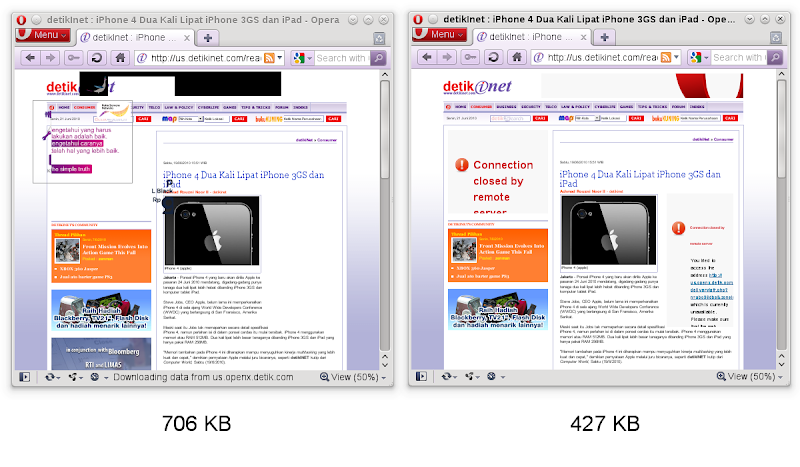
It is unheard that content filtering can dramatically improve your browsing experience. Because it cuts the bandwidth usage, it does translate to lower cost for those who are not lucky enough to get unlimited data plan. But most importantly, throwing garbage out of the web pages definitely speeds up the page loading. For this filterproxy example, I did a very unscientific benchmark and test it with Detik.com news site (now you get the answer why the included blacklist.txt contains only some basic advertisement-laden sites). The screenshots below (click to enlarge) show the unfiltered version (left) and the filtered version (right). Notice also the whopping 40% of bandwith saving!

My promise was to post two variations from that simple proxy example. This counts as one of them, and when the time allows me to clean-up to the other, you'll know it. Stay tuned and happy proxying!

Saturday, May 15, 2010

QNetworkAccessManager, tracenet, Speed Tracer

Just like Rich's trick with QNetworkAccessManager, I have done something similar which I call tracenet (around 150 lines of code). Though I have committed this example to X2 some time ago, only now I have the chance to blog about it.

The idea is to subclass QNetworkAccessManager and reimplement its createRequest method so that we can keep track all the network responses and replies. This is useful for your network-based application, or even for e.g. QtWebKit. As a matter of fact, the tracenet example captures the network traffic as you load a URL into a web page.

Now, the next step is how to visualize the result. While it's certainly possible to craft a Qt-based fancy GUI for this (maybe using Qt Quick?), let's think outside the box. Unless you live in a cave, I am sure you are aware that there is this nice tool called Speed Tracer, part of GWT, an extension for Google Chrome or Chromium. For this purpose, we won't use the live profiling feature of Speed Tracer, but rather its ability to visualize network requests and replies (with nice timeline and so on). All we have to do is to carefully spit some JSON-formatted data that match the Speed Tracer data dump format. And that is exactly what tracenet does!

The screenshot below gives an exemplary result from running tracenet on my Nokia N900 when it accesses New York Times front website, a notoriously complicated web page. All I did was to execute "tracenet > nytimes.htm", transfer back the HTML file to the laptop and then open it with Chromium on OpenSUSE, click on "Network (resources)" line, and voila! You can click on each entry to get detailed timing info, use zoom in/out, and many other features of Speed Tracer. Refer to some tutorials if you are new to Speed Tracer.

If you want some follow-up and challenging exercise, try to split Speed Tracer code so that the pure GWT-part can run on any browser. Then you can just package it with QtWebKit and use it to show the outcome of all your network sniffing. Have fun!

Monday, April 05, 2010

simple http proxy server in 100 lines

I guess a simple proxy server should have been an example in Qt Network module. What I mean of course a real proxy server based on Qt, not about using a proxy server via QNetworkProxy class. After all, there are other more complex examples like the torrent client and Google suggest (yeah, blame me for the latter). As a matter of fact, there are e.g. a gazillion proxy servers written in Python.

Look no more. I posted an example in the X2 repository, under the directory network/webproxy. The code is written for clarity and not for performance. In fact, fancy error handling is even omitted (minimalism rulez!). There is no support for pipelining, or in-memory cache, or per-connection thread, or even secure connection via https. I leave them as exercises for the curious readers.

If we focus on things which work, here they are: asynchronous socket handling, different request methods (GET/PUT/POST/HEAD), persistent connection aka keep alive, and even Flash and HTML 5 video streaming. Yes, you can still watch YouTube or Vimeo if you hook your browser into this little proxy. For a few hours of hacking and 92 lines of code (as reported by sloccount) and certain ways to abuse QObject, I could not be more happier.

There will be two other offspring examples based on this one. So stay tuned. Meanwhile let's just hope nobody would ask me for a colorful UML diagram for this snippet...

PS: Special thanks to Jan Erik for his feedback and review.