My blog has been moved to ariya.ofilabs.com.
Showing posts with label code. Show all posts

Monday, June 21, 2010

proxy server with filtering feature

Beside exploring San Diego, I had done some coding intermittently only. My apology if I do not update X2 with fresh new examples often enough.

Having said that, here is one network-related example: a minor tweak to the previous example of Qt-based proxy server. Basically it adds a minimalistic URL filtering support, in the form of blacklisting certain URLs which start with some predefined strings. The code is available in the usual place, X2 repository, under the directory network/filterproxy.

While major browsers support some variants of content blocking, be it via an extension like AdBlock or as a feature built-in into the browser itself, this new filterproxy should work with any browser that supports proxy. Alas, I did not bother to implement an AdBlock-compatible rule system because it would complicate the code. Again, consider this is a proof of concept only. A challenging exercise would be to fully support the most known subscription filters.

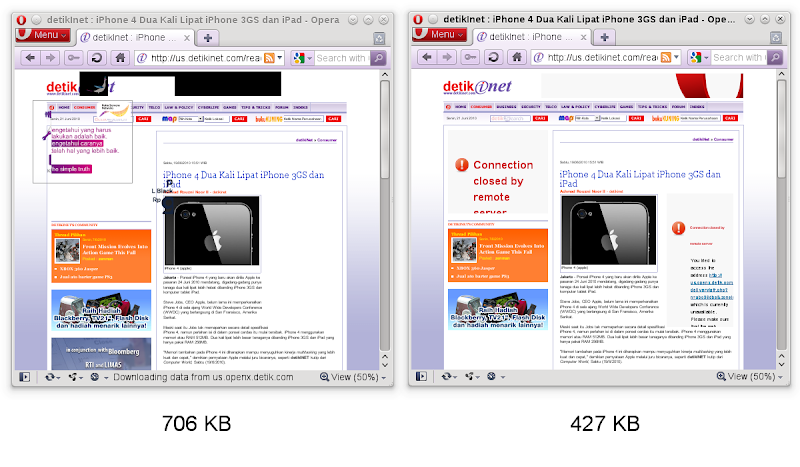
It is unheard that content filtering can dramatically improve your browsing experience. Because it cuts the bandwidth usage, it does translate to lower cost for those who are not lucky enough to get unlimited data plan. But most importantly, throwing garbage out of the web pages definitely speeds up the page loading. For this filterproxy example, I did a very unscientific benchmark and test it with Detik.com news site (now you get the answer why the included blacklist.txt contains only some basic advertisement-laden sites). The screenshots below (click to enlarge) show the unfiltered version (left) and the filtered version (right). Notice also the whopping 40% of bandwith saving!

My promise was to post two variations from that simple proxy example. This counts as one of them, and when the time allows me to clean-up to the other, you'll know it. Stay tuned and happy proxying!

Saturday, May 15, 2010

QNetworkAccessManager, tracenet, Speed Tracer

Just like Rich's trick with QNetworkAccessManager, I have done something similar which I call tracenet (around 150 lines of code). Though I have committed this example to X2 some time ago, only now I have the chance to blog about it.

The idea is to subclass QNetworkAccessManager and reimplement its createRequest method so that we can keep track all the network responses and replies. This is useful for your network-based application, or even for e.g. QtWebKit. As a matter of fact, the tracenet example captures the network traffic as you load a URL into a web page.

Now, the next step is how to visualize the result. While it's certainly possible to craft a Qt-based fancy GUI for this (maybe using Qt Quick?), let's think outside the box. Unless you live in a cave, I am sure you are aware that there is this nice tool called Speed Tracer, part of GWT, an extension for Google Chrome or Chromium. For this purpose, we won't use the live profiling feature of Speed Tracer, but rather its ability to visualize network requests and replies (with nice timeline and so on). All we have to do is to carefully spit some JSON-formatted data that match the Speed Tracer data dump format. And that is exactly what tracenet does!

The screenshot below gives an exemplary result from running tracenet on my Nokia N900 when it accesses New York Times front website, a notoriously complicated web page. All I did was to execute "tracenet > nytimes.htm", transfer back the HTML file to the laptop and then open it with Chromium on OpenSUSE, click on "Network (resources)" line, and voila! You can click on each entry to get detailed timing info, use zoom in/out, and many other features of Speed Tracer. Refer to some tutorials if you are new to Speed Tracer.

If you want some follow-up and challenging exercise, try to split Speed Tracer code so that the pure GWT-part can run on any browser. Then you can just package it with QtWebKit and use it to show the outcome of all your network sniffing. Have fun!

Monday, April 05, 2010

simple http proxy server in 100 lines

I guess a simple proxy server should have been an example in Qt Network module. What I mean of course a real proxy server based on Qt, not about using a proxy server via QNetworkProxy class. After all, there are other more complex examples like the torrent client and Google suggest (yeah, blame me for the latter). As a matter of fact, there are e.g. a gazillion proxy servers written in Python.

Look no more. I posted an example in the X2 repository, under the directory network/webproxy. The code is written for clarity and not for performance. In fact, fancy error handling is even omitted (minimalism rulez!). There is no support for pipelining, or in-memory cache, or per-connection thread, or even secure connection via https. I leave them as exercises for the curious readers.

If we focus on things which work, here they are: asynchronous socket handling, different request methods (GET/PUT/POST/HEAD), persistent connection aka keep alive, and even Flash and HTML 5 video streaming. Yes, you can still watch YouTube or Vimeo if you hook your browser into this little proxy. For a few hours of hacking and 92 lines of code (as reported by sloccount) and certain ways to abuse QObject, I could not be more happier.

There will be two other offspring examples based on this one. So stay tuned. Meanwhile let's just hope nobody would ask me for a colorful UML diagram for this snippet...

PS: Special thanks to Jan Erik for his feedback and review.

Saturday, February 20, 2010

distcc, VirtualBox, NAT

The following scenario is quite typical. Your family member, spouse, or coworker has this fantastic, powerful, brand-new multicore machine which, for some reasons, has to run Windows or Mac OS X. On the other hand, you probably have some el-cheapo laptop which is also wonderful but it lacks the processing power to do heavy-duty build and compile. Now, what if you can exploit the other box for a distributed compile? Especially if the powerful box seems to be idle once a while, doing nothing.

Many of you already figure it out the solution: let's install Linux on a virtual machine and use tools like distcc or icecream. In fact, this is quite easy to do. I managed to find out the details, even if I have only little idea about network stuff.

Side note: I don't see why icecream would not work. But since I did try distcc, that's what I wrote below.

For the following explanation, refer to the above exemplary network setup. Basically I run virtualized openSUSE inside VirtualBox. You don't even need a full-blown graphical system, you can create a customized openSUSE installation (no X11 but with some development tools like make, gcc, g++, etc) using SUSE Studio.

First of all, we need to configure VirtualBox to do port forwarding. If you read the manual, you see that the default networking is NAT, which is what we use, along with extra forwarded ports. To do this, run the following on the command prompt (in your installation folder, e.g. C:\Program Files\Sun\VirtualBox for Windows, tweak for Mac OS X), changing openSUSE with the name of your virtual machine:

VBoxManage.exe setextradata "openSUSE" "VBoxInternal/Devices/pcnet/0/LUN#0/Config/distcc/HostPort" 3632
VBoxManage.exe setextradata "openSUSE" "VBoxInternal/Devices/pcnet/0/LUN#0/Config/distcc/GuestPort" 3632
VBoxManage.exe setextradata "openSUSE" "VBoxInternal/Devices/pcnet/0/LUN#0/Config/distcc/Protocol" TCP
VBoxManage.exe setextradata "openSUSE" "VBoxInternal/Devices/pcnet/0/LUN#0/Config/ssh/HostPort" 2222
VBoxManage.exe setextradata "openSUSE" "VBoxInternal/Devices/pcnet/0/LUN#0/Config/ssh/GuestPort" 22
VBoxManage.exe setextradata "openSUSE" "VBoxInternal/Devices/pcnet/0/LUN#0/Config/ssh/Protocol" TCP

The last 3 lines are not important for distcc itself, however it's quite handy since you will be able to ssh to the machine (on the port 2222, i.e. the forwarded one and not port 22) and start or stop distcc remotely.

Side note: I was told that bridged networking mode should work as well (even without the hassle of port forwarding). However, I did not manage to make it working in my setup.

In addition, tweak the settings of your virtual machine so you get more than one CPU cores. For example, on a quad-core machine, giving the virtualized openSUSE two or three cores might be better, considered if the host system does not run need all that burning power.

Next step is to install distcc both on the virtualized openSUSE (anjali) and your laptop (latika). The easiest way is to use the one click install feature, just go to software.opensuse.org, click on Package Search, type in distcc and press Enter and then install both distcc and distcc-server. To do it manually, add http://download.opensuse.org/repositories/home:/dbahi/openSUSE_11.2/ to your repositories and install using:

sudo zypper in distcc distcc-server

After that, on anjali, run the following (as normal user, no need to sudo/root):

/usr/sbin/distccd --daemon --allow 192.168.1.0/24

Now on your own machine, latika in the above example, set first where you want to distribute the compile:

export DISTCC_HOSTS='anjali,lzo'

If you want, do this in your .bashrc or shell startup script for your convenient.

Compiling and building a project is now as easy as replacing the plain make command with:

make -j4 CC=distcc CXX=distcc

For troubleshooting, run distccmon-text 3 (nice for static logging) or watch distccmon-text (useful for real-time view).

Supposed another machine, e.g. naina, wants to join the party, just do the same steps. Don't forget to adjust DISTCC_HOSTS so that the compile will be distributed also to naina.

That's it! For more info (I barely scratch the surface) and better optimization, refer to the manpage of distcc and distccd.

Now the (trivia) question is, the host that runs anjali, who do you think he is? :)
Wednesday, September 23, 2009

frozen in the headlights (have I made the final sacrifice?)

This slick stuff is mostly educational (for the lazy, see the 30-second YouTube video courtesy of Alessandro). With all the accelerated graphics (with those alphabet soups) these days, who on earth uses ray casting for real-world apps? Nevertheless, since I still keep the piece of code (read: a function, literally) I wrote ages ago, why not giving it a try again?

Testing it on Nokia E71 (powered by ARM 369 MHz processor), I am content to get a consistent 25 fps at QVGA resolution (and the code is still portable!). I reckon I need to resort to platform-specific, e.g. Anti Tearing API for S60, if I want to push the frame rate further.

For the code and the explanation, head to the S60 ray casting demo. You would need the Qt 4.5 Tower release to build it for your favorite phone. Also, you need a four-way controller as I haven't bothered to let it run on a touch device.

Final (friendly) reminder: use sloccount and check yourself how long this example is. Why? Because usually people think I try to trick them when I reveal the size of the source code :)

Friday, September 11, 2009

SVG: parsing and content optimization

A few weeks ago, just for a change (between the usual QtWebKit bug-fixing and patches juggling), I did take a look at our QtSvg module. According to some internal reports, QtSvg is not fast enough when parsing a large and complicated SVG. Of course, slow is relative, slow to what. And arguably, parsing time is not as important as rendering time. But if you stash your user-interface elements in some sort of SVG theme, loading time becomes a factor (caching the pixmaps whenever possible also helps). Of course, reduced size served in a web server can decrease the bandwidth as well (think of all the SVGs in Wikipedia).

Still, I decided to have a look, just in case there are low-hanging fruits I can grab. And I was right, far from being an SVG expert, with just two days of work I managed to squeeze its performance a bit, which you'd enjoy already in the recent 4.6 preview.

The chart above - shorter is better - represents the comparison of the time spent in QSvgRenderer::load(), measured using CPU tick counter (in millions of ticks), comparing Qt 4.5 and 4.6. I also tested some other files as well, see the bigger bar charts. In all measurements, the 95% confidence intervals were well below 1%. In-house Theme refers to an internal SVG that unfortunately I can't share. Tiger is the SVG version of the famous head in PostScript (taken from GNU GhostScript), something I have shown before. Imperial Coat of Arms of France is another complex SVG, from Wikipedia Commons. World Map is the public domain blank grayscale world map from Wikipedia. There are a bunch of other test files I used, they mostly show the same improvements.

As you can see, Qt 4.6 would enjoy a bit of speed-up (in some cases up to 1.4x) when loading and parsing SVG.

However, I did not stop there. For the fun of it, I quickly hacked a Qt-based, command line SVG minifier, dubbed SVGMin. More about it can be read in the detailed Quick Start, but basically it tries to eliminate redundant garbages which have no effect whatsoever in the final rendering.

What follows is the chart showing the same type of measurement but I added the result with the minified SVG (see also the full comparison chart). The result should speak for itself:

I plan some more improvements to the SVG minifier, for example collapsing a single grouped element (<g><path ...></g> makes no sense), group a bunch of nodes with similar attributes (no need to duplicate the same fill colors over 100 circles), remove useless attributes (why there is fill-* for fill:none?), and many others. Hold your breath.