After playing a while with Qt 4.4 on my N800 (will be the same for N810), the impression of "slow" (like latest Adam's latest post) is something that I predicted will soon come out. So far, my very brief investigation reveals that the cause for this is both simple and sad: the Maemo's X is running 16-bit visual (N8xx's display is Highcolor only, not Truecolor). Thus, if you do something fancy with 32-bit stuff, like running a QPainter on a Format_ARGB32 or Format_ARGB32_PremultipliedQImage, then basically you force a 32-to-16 conversion every time you blit the image.
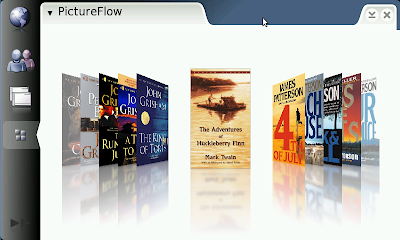
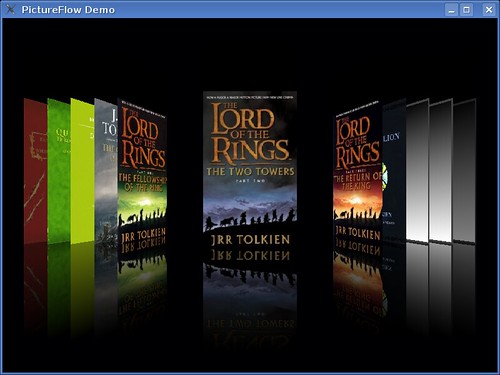
Take a look at PictureFlow, the infamous clone of Cover Flow. You can just checkout it, run qmake and make as usual and start to have some fun (all inside Scratchbox, and after that transfer it to the N8xx).
Surprisingly, it runs horribly slow, probably less than 5 fps. Consider than PictureFlow does its magic by straight pixel manipulation and then just blit the result, this looks really weird. However, it was found out that Qt needs to perform the conversion from 32-bit image to 16-bit pixmap for every single frame, hence the terrible slow down. In short, there is more CPU power wasted for the blitting vs for the rendering. Check your callgrind output to confirm this.
Good news: this is something that can be fixed (both in the application level and probably inside Qt). Personally this one is my favorite aim for Qt 4.5. Once we start to see ported Qt apps for Maemo, we can't afford to allow a potential performance penalty like this, it would just give a wrong impression of Qt. Don't you agree?
Sidenote: 16-bit can be useful because (on a non-accelerated graphics system), you can perform faster full-screen update (less transferred bytes). 32-bit is however easier to handle because each color component lives in a separate byte.
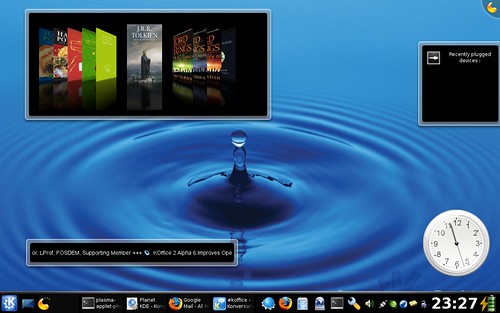
PhotoFlow, which I introduced less than 48 hours ago, can also be realized as a plasmoid. It is the top left applet in the screenshot above. I have never written a plasma applet in my life before, so it took me quite a while to figure out how the mechanism works. And frankly, I am still not sure whether such a kind of widget can be really useful at all.
I guess I will wait until KDE 4.1 before I place this stuff in KDE's playground. By that time, Plasma itself should already stabilize. Probably it is even better to integrate it with the Picture of the Day data engine. Or even with the slideshow plasmoid. Or perhaps do you have any other idea?
As I wrote before, the obvious complaints people are having after trying out Chad's precompiled PictureFlow for Windows Mobile are (1) slow start-up and (2) memory footprint. These stem from the fact that the example demo program that I included was written for clarity so that you can get your feet wet quickly. To overcome the initial loading and memory consumption problem, of course you have to attack the problem from a different point of view.
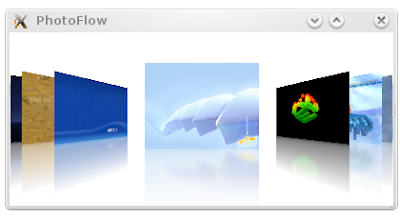
So here it comes: PhotoFlow. It is a small application for view images and photos, designed to run on mobile devices --like those HTC smartphones, other Windows Mobile phones, Qtopia-based handsets etc-- although you can test it of course on the desktop (but I will focus on the intended target platform only). The usual trick employed here is the so-called "delayed loading". PhotoFlow never attempts to load, resize, and prepare an image to be rendered if that image is not in the vicinity of the user's view. Thus, it starts rather instantly and won't suck hundred of MBs of the precious memory space. This is even done without changing anything in the original PictureFlow widget, we just need to subclass it and handle several things smartly.
Because I am (still) insane, PhotoFlow supports both Qt/Qtopia 4 and the old Qt/Embedded 2.3 (actually also Qt 3, for which there isn't any embedded version) with a single code base. Also the delayed loading part has two versions: with and without QThread. Of course the former is better but some platforms with Qt/E (or even Qtopia, if you want) might not support threading at all, hence the latter.
Get it while it's hot and flood my inbox with your flames.
Blur is an interesting effect, mainly because it lets us enjoy the main object yet the out-of-focus parts add something to the realism. Like in the default KDE 4.0's splash screen:
For PictureFlow, I decided to add the support for optional blur effect for the reflection, as shown in the following comparison:
It is even more enjoyable when you run the demo program and see those book covers sliding, as if they are ice skating. Shader guru can quickly point out the fakeness of the blur. Rather than blurring the "floor" after the reflection is painted there, I choose to blur the reflection for each image beforehand. Fake but fast and fun enough. As for the algorithm, it is the famous blazing-fast exponential blur from Jani Huhtanen, used among others in KDE 4's Plasma.
Another improvement is that the background color can be customized, not limited to black. In fact, black is particularly suitable to do fast reflection illusion cause blending a specific color with black can be approximated by multiplying its RGB components with a decreasing factor. But since I saw that Cover Flow for iPod nano is with white background, I thought I just let you use your favorite color for PictureFlow.
In addition, I refactored the code so that it is more maintainable. For simplicity, the horribly long look-up sine/cosine table has been reduced with the help of simple interpolation. Even better, PictureFlow now supports Qt 4 (Win32, Linux, Mac, Qtopia, Windows Mobile), Qt 3 (tested on Linux only), and Qt 2 (for Qt/Embedded platform) with a single code base. Maybe even Symbian in the future :-)
Just over these two weeks, over 5 thousands came to my humble blog from XDA-developer's forum. It turned out that Chad "thundershadow14", based on the HTC Touch port, set to create a PictureFlow-based image viewer and release it as Windows Mobile executables. And seems that people like it, there are already 290 posts in that thread as I write this. It was reported to work on a wide range of HTC smartphones, among others Touch, Trinity, Herald, Hermes, Kaiser, Atlas, Prophet, Himalaya, Wizard, as well as other Windows Mobile devices like Treo 750, LG KS20, Asus P535, Axim X51v, and a bunch others. So if you have an HTC gadget (preferably with WM6), give it a shot. Looks like it quickly becomes one of the first popular Qt/WinCE-based application, this is considering that (as of now) the final official Qt/WinCE is not even released yet!
From these two exciting developments, and since the response is overwhelming (I can't still believe people *do* really bother to mess around with such a weekend project), I want to be a bit more serious and plan to create a specialized image viewer with that lovely CoverFlow effect, designed with mobile device in mind (and targeting Qt/WinCE and Qtopia). From what I read in the forum, people are not happy with the loading time and memory consumption. Of course, this is definitely the case since the example I include with PictureFlow source code is not optimized for speed or memory footprint. It is a typical example program, meant to show how to use PictureFlow only, not as a basis of a real-world application. Thus, a really usable viewer must be implemented differently.
So, folks, stay tuned. Of course you can send me a smartphone, something like HTC Kaiser, if you want. I'll be glad to take it :-)
In the third generation of iPod nano, Apple has included the famous Cover Flow feature. But what if your iPod belongs to the generation before this? Well, AFAIK Cover Flow is not available. Either Apple would like the owners to upgrade or the hardware is simply not powerful enough. Pick your battle.
The solution: use Rockbox. It is a firmware replacement not only for Apple iPods but for a wide range of other popular music players. Since some time ago, it sports the PictureFlow plugin (still in continous development) which has the same idea as Cover Flow. This plugin is based on my PictureFlow Qt widget, something that I have mentioned before. The obligatory screenshot (courtesy of Jonas):
Trolltech Greenphone is a smartphone for Qtopia-based mobile-platform development. Although not available anymore, developing Greenphone is useful to learn Qtopia, and vice versa. You can still learn Qtopia/Greenphone without the real device using the
Greenphone SDK within VMWare trick, which what I used to test my PictureFlow code some time ago.
But of course running a program inside an emulator is different than in a real 3-d device. Seeing is believing. Jonas Hurrelmann was very nice to check PictureFlow on Greenphone, as evidenced from his YouTube video. As expected, the performance is quite satisfactory. Kudos to Jonas!
Cover Flow effect for Dreambox
Dreambox is a satellite set-top box running Linux. Because it runs Linux and can be modified, it is popular among hackers. In case you miss it, few weeks ago Brad Hughes compiled and built Qt for his Dreambox DM 7000. Check his demo video...
...and wait 41 seconds and see what is shown. Does that look familiar to you? (Hint: read this blog post again from top)
Cover Flow effect for iPod
Huh? Doesn't "Cover Flow for iPod" sounds too Zen-like? Didn't His Steveness show it before?
Well, this one is different. Jonas Hurrelmann (yes, the same Jonas, kudos to him again) ported the PictureFlow code to Rockbox and then ran it on the iPod 5.5G. The obligatory video is his YouTube clip:
Careful readers might notice that it should be a Rockbox plugin (for those who live under the rock, Rockbox is the ultimate firmware replacement for many music players and it is completely open-source). Since Rockbox can support not only Apple iPod, but also Archos Jukebox, Sandisk Sansa, Cowon and many other popular MP3 players, this opens the possibility that those devices might enjoy CoverFlow-effect as well. Let's wait for Jonas (and perhaps others) for further development.
HTC Touch is a touch-screen smartphone running Windows Mobile 6.0. It is armed with 200 MHz 32bit Texas Instruments OMAP 850 processor and 2.8 inch color transflective 240 x 320 screen. Like other Windows Mobile devices, HTC Touch is interesting because Qt runs also there, using Qt/WinCE.
After Chumby, HTC Touch is another real device that enjoys Apple-like Cover Flow effect, of course by using PictureFlow. Espen recently showed PictureFlow running on his HTC Touch, as can be seen in his YouTube video:
"Awesome", according to him.
We trust you, Espen :-)
Now I know that someone must have tried this on the Greenphone. Can anyone give a video or even a picture?
Update: see also PictureFlow running on different mobile devices, from Greenphone to HTC smartphones.
Chumby is a new hardware widget with open systems design. Jesper recently showed how to put Qt on Chumby, along with PictureFlow, as can be seen in his YouTube video:
Chumby is not even yet available on stores, you got it only if you're an insider. And it's like only a week after I placed the code of PictureFlow on the net. And with Jesper's nice work, this cool little Chumby has already CoverFlow-like effect on par with iPod.
It is also a proof that PictureFlow's performance is satisfactory even on portable device. Chumby has only a 300Mhz ARM9 processor, but the effect is quite smooth.
Still about PictureFlow, my CoverFlow-effect clone, I did give some thoughts on improving its rendering quality without sacrificing the performance and still doing it in software (no help from graphics card).
The first that came to my mind is by using bilinear filtering in the texture mapper. As you might predict, the texture mapper itself needs only affine transformation, each cover/slide is rendered column-by-column. Since the z distance for all pixels in a column is constant, affine transformation is enough and can be implemented efficiently. Adding bilinear filter, however, means doing linear interpolation for each and every pixel. If it is done in one dimension only, i.e. vertically, that is still manageable. But since (to assure the quality), we need to perform it in both dimension, the whole stuff would become too slow.
Then one morning I realized that I don't really need to do the filtering on-the-fly. Just transform the cover image before it is rendered to screen, we can take advantage of Qt's smooth pixmap scaling for this purpose. Won't be as good as real interpolations, but everything up to now are dirty hacks anyway.
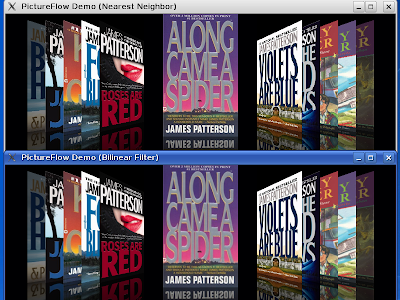
Here is the result so far (clink to enlarge). Compare the filtered version against the original nearest-neighbor approach. Can you spot the improvement?
For starter, you can see that the jaggy lines between the cover images and the black background (obvious when the cover is white) become less noticeable in the filtered version, as shown below. Left is nearest neighbor, right is bilinear filter:
There is no impact at all on performance when doing the animation effect, everything is as smooth as before.
There are however disadvantages with my first approach. First, the cover image is enlarged four times in both dimension, thus making it consuming 16x more memory space. The surface cache becomes very large. Even for book covers (150x200, stored in ARGB32 format), each of them requires 1.8 MB. This is terrible for portable device, although still manageable on modern desktop machine. In addition, creating the surface cache is slower now due to the necessary image scaling.
The next steps would be more optimizations. First, the surface cache will still keep the original dimension (150x200 in the above example). The scaled version will be constructed only whenever necessary, i.e. right before it is texture-mapped. In addition, there is no need to perform filtering while the animation still takes place. The covers move so fast, a bit sacrifice in the quality won't be noticeable to human eyes.
Let's see where this brings me further. Seems that software-rendered CoverFlow effect done in C++ with a quality that can match hardware-assisted version is quite feasible.
Another no-time-yet-to-finish-it pet project of mine is a media player, something like for media center or portable device. I code it in SDL, in a hope that targeting platforms like GP2x and Nokia N800 are easy. But knowing that Qtopia (soon) runs also on N800, I am thinking of moving the code to pure Qt for ease of maintenance.
Unless you live under the rocks, CoverFlow should sound familiar. For the said media player, I have an efficient implementation of CoverFlow effect, called PictureFlow. Last weekend I decided to port the code to sane C++ and Qt and here is what I get now:
You can see that the typical "flowing" ala CoverFlow is implemented already. Even, the first and last covers always fades in and fades out during the animation (so a cover just doesn't come in out of nowhere). Reflection is also there, done by crude-blending the cover with black (that's why black background is so sweet!) and then placing it in the surface cache.
The important feature of PictureFlow is that it does not need 3-d accelerated graphics system. Everything is done in a software renderer. This is not so surprising, consider that I target the original media player for portable device(s). Even the latest sub-GHz iPod can have CoverFlow, so there is no reason to demand fast OpenGL implementation just to enjoy this little piece of eye candy. As long as blitting to screen is fast, you're set. Moreover, no floating-point operation is carried out so that it's fast enough even on ARM-like platforms.
On the other, using pure software renderer has a major drawback, namely the rather lower rendering quality (traded for optimal speed). As you witness from the screenshot, the edges of the tilted images are jaggy. However, with 225 dpi screen like in N800, these jaggy lines (hopefully) won't be noticeable. This can't be avoided without causing too much performance penalty. In fact, technically there is not even a perspective-correct texture mapper. It is just the same hack like the texture mapper done in raycasting-based game, e.g. the classic Wolfenstein 3-D ages ago. This is also the reason to bypass Qt own rasterizer, as we can do some sort of "cheating" and map the texture really fast. Texturing is done more like nearest neighbor approach rather than bilinear filtering, which gives less pleasant result if you stare at the rendering result too long.
Also, software renderer is much slower than hardware-assisted one. Thus, the trick is to keep the widget as small as possible, but not smaller. With reasonable size like 800x350 pixels, on fairly modern machines, you'd get something like 45 fps, which is quite satisfactory. I even tested on old 800Mhz box, it is not as smooth as in a dual-core system, but runs nevertheless well enough.
Overall, this widget is still very basic though already functional. For example, there is no text nor fancy scrollbar which are typically superimposed on bottom side. I guess, in this case, you can subclass PictureFlow widget and add the extra gimmicks by yourself. In addition, as trade-off, covers with alpha channel and covers with non-uniform size won't be supported, this is to minimize texture overdraw.
Anyway, this widget is released as open-source (under MIT license), see http://pictureflow.googlecode.com. So, just grab it while it's hot.
Some ideas where it could be useful elsewhere:
For album browsing in Amarok. At the moment, Amarok for KDE4 has its own CoverFlow-like feature, but last time I check it requires OpenGL so it works well only when the graphics system is 3-d accelerated.
Choosing a slide in a presentation (so maybe it could be integrated into KPresenter?). Imagine you're running your presentation and one of your audience ask you to show some previous slides, wouldn't be cool when you flip through the slides with this flowing effect?
Quickly skim through photos, useful in Digikam, Gwenview, or similar imaging tools. Since it's used as a chooser, not full-fledged slide show, the size could be kept small and thus the performance should be acceptable.