My blog has been moved to ariya.ofilabs.com.
Showing posts with label gadget. Show all posts

Tuesday, July 26, 2011

tablets and web performance

Benchmarks, and the results of running them, are attractive because they eliminate the need to digest an arbitrary complex machinery, reducing it into a meaningful and powerful number. Comparison is thereby made easier, as it is now a matter of playing who has the biggest gun game.

In the areas of web performance, every benchmark becomes more like durian, either you hate it or you love it. No matter how useful (or useless) a benchmark is, there are always folks who defend it and others who despise it. Signal-to-noise ratio changes dramatically when the discussion over some benchmark results is started.

I still reckon that in the years to come, what makes a great experience while browsing the web depends on the performance of (surprise!) DOM access. Common JavaScript frameworks (like jQuery, Prototype, Ext JS, MooTools, YUI, Dojo, and many others) still form the basis for a lot of rich web sites and interactive web applications out there, at least for the time being and till the near future.

While SunSpider and V8 benchmarks are geared towards pure JavaScript performance and Kraken is better suited for future heavyweight applications, Dromaeo becomes a solid candidate for DOM performance analysis. In particular, its set of DOM tests is very valuable because it presents a nice sample of the behavior of framework-based sites. In this context, butter-smooth DOM modification has a bigger impact than just blazing-fast trigonometric computation, at least for gajillions web pages out there.

Since more and more people are accessing the web through mobile platforms these days, I decided to test several popular tablets out there and summarize the result in one graph below (updated):

For the detailed comparisons, check out the complete Dromaeo numbers of all tablets (left-to-right: Galaxy Tab, iPad 2, Playbook, TouchPad). If you find the above result is different that what you test yourself, shout out. I want to be careful not to propagate any discrepancies or misleading results. As usual, take the above beautiful collection of colored bars with a pinch of salt.

Samsung Galaxy Tab 10.1 is powered by Android 3.1 (Honeycomb) Build HMJ37, iPad 2 is using iOS 4.3.3, RIM Playbook's firmware is 1.0.7.2670, which the HP TouchPad has webOS 3.0. The choice of the devices represent a variety of fresh ARM-based tablet operating systems in the market as of this writing.

With Qt coming closer and closer to the become a good companion of the green robot, I wonder how would QtWebKit compete with those numbers. I think we will find out the answer in a couple of months, maybe even sooner.

Thursday, December 16, 2010

motion vs orientation

I already showed the use of device orientation in a fun game called Box of Marbles. Based on my experience trying out this API implementation, often it is easy to get confused by device motion vs device orientation. Thus, I created two web-based applications (using on Sencha Touch): Device Motion and Device Orientation. Each basically just visualizes the values of the data in a bunch of sliders:

You can find the code in the usual X2 repository, under the subdirectory javascript/devicemotion and javascript/deviceorientation, respectively. Obviously, the rest of Sencha Touch library is needed before you can deploy and run the examples. For the lazy, just run the live demo for Device Motion and Device Orientation (they support offline mode).

While right now only iOS 4.2 on iPhone/iPad/iPod Touch implements this API, I have a strong hope that Android (post Gingerbread) and Nokia (thanks to QtWebKit and Qt Mobility) will support this cool API in the near future. Well, at least I do plan to revive my Symbian setup to custom compile QtWebKit and test it on Nokia N8.

Side note: from my limited understanding, seems that both accelerometer and gyroscope are needed in order to supply the accurate data, much like in an inertial navigation system ("Inertial Phone", anyone?).

Thursday, August 27, 2009

Nokia N900: Linux-based mobile phone

Finally it's out. N900 is the first Linux-based 3G/HSPA phone from Nokia, powered by Maemo. There are already some high-quality awesome pictures of the phone, or just enjoy the following taken by my countryman who is working for Maemo. Or watch its 75-second promo video clip. Price is not set yet, but seems to be in the EUR 500 range. The geek side of you might want to glance at the specifications (and mark that OpenGL ES 2.0!).


Saturday, August 23, 2008

Qt 4.4 and Maemo

After playing a while with Qt 4.4 on my N800 (will be the same for N810), the impression of "slow" (like latest Adam's latest post) is something that I predicted will soon come out. So far, my very brief investigation reveals that the cause for this is both simple and sad: the Maemo's X is running 16-bit visual (N8xx's display is Highcolor only, not Truecolor). Thus, if you do something fancy with 32-bit stuff, like running a QPainter on a Format_ARGB32 or Format_ARGB32_Premultiplied QImage, then basically you force a 32-to-16 conversion every time you blit the image.

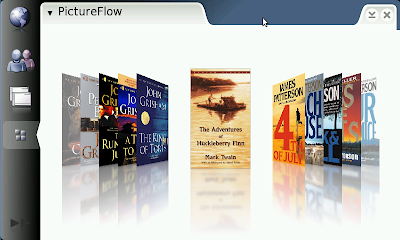
Take a look at PictureFlow, the infamous clone of Cover Flow. You can just checkout it, run qmake and make as usual and start to have some fun (all inside Scratchbox, and after that transfer it to the N8xx).

Surprisingly, it runs horribly slow, probably less than 5 fps. Consider than PictureFlow does its magic by straight pixel manipulation and then just blit the result, this looks really weird. However, it was found out that Qt needs to perform the conversion from 32-bit image to 16-bit pixmap for every single frame, hence the terrible slow down. In short, there is more CPU power wasted for the blitting vs for the rendering. Check your callgrind output to confirm this.

Good news: this is something that can be fixed (both in the application level and probably inside Qt). Personally this one is my favorite aim for Qt 4.5. Once we start to see ported Qt apps for Maemo, we can't afford to allow a potential performance penalty like this, it would just give a wrong impression of Qt. Don't you agree?

Sidenote: 16-bit can be useful because (on a non-accelerated graphics system), you can perform faster full-screen update (less transferred bytes). 32-bit is however easier to handle because each color component lives in a separate byte.

Thursday, March 13, 2008

Guitar Hero for C64

Well, ray tracing into a sparse voxel octree might be inspiring, but for the time being, Toni's Shredz64, which is essentially the Commodore 64 version of Guitar Hero, is tantalizing!

Tuesday, March 04, 2008

PhotoFlow as a plasmoid

Plasmoids on KDE 4

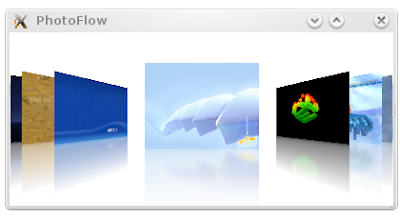
PhotoFlow, which I introduced less than 48 hours ago, can also be realized as a plasmoid. It is the top left applet in the screenshot above. I have never written a plasma applet in my life before, so it took me quite a while to figure out how the mechanism works. And frankly, I am still not sure whether such a kind of widget can be really useful at all.

I guess I will wait until KDE 4.1 before I place this stuff in KDE's playground. By that time, Plasma itself should already stabilize. Probably it is even better to integrate it with the Picture of the Day data engine. Or even with the slideshow plasmoid. Or perhaps do you have any other idea?

Monday, March 03, 2008

introducing PhotoFlow

As I wrote before, the obvious complaints people are having after trying out Chad's precompiled PictureFlow for Windows Mobile are (1) slow start-up and (2) memory footprint. These stem from the fact that the example demo program that I included was written for clarity so that you can get your feet wet quickly. To overcome the initial loading and memory consumption problem, of course you have to attack the problem from a different point of view.

So here it comes: PhotoFlow. It is a small application for view images and photos, designed to run on mobile devices --like those HTC smartphones, other Windows Mobile phones, Qtopia-based handsets etc-- although you can test it of course on the desktop (but I will focus on the intended target platform only). The usual trick employed here is the so-called "delayed loading". PhotoFlow never attempts to load, resize, and prepare an image to be rendered if that image is not in the vicinity of the user's view. Thus, it starts rather instantly and won't suck hundred of MBs of the precious memory space. This is even done without changing anything in the original PictureFlow widget, we just need to subclass it and handle several things smartly.

Because I am (still) insane, PhotoFlow supports both Qt/Qtopia 4 and the old Qt/Embedded 2.3 (actually also Qt 3, for which there isn't any embedded version) with a single code base. Also the delayed loading part has two versions: with and without QThread. Of course the former is better but some platforms with Qt/E (or even Qtopia, if you want) might not support threading at all, hence the latter.

Get it while it's hot and flood my inbox with your flames.

Friday, February 01, 2008

KDE and KOffice on N800

Thanks to the efforts of our hero Matthew Lewis (aka penguinbait), KDE 3.5.8 with KOffice can be enjoyed on both Nokia N800 and N810 (read also the step-by-step instructions). One of the screenshots from him:

Once I finally get OS2008 sorted out on my N800, I'll definitely give it a try.

Friday, January 25, 2008

EOS 450D

For those who were waiting for this Canon EOS 450D, finally it's out! There is a nice overview in dpreview.com, comparing 450D and 400D. Basically, it sports a 12 megapixel CMOS sensor, a SecureDigital card slot (instead of CompactFlash), larger viewfinder, large (3") display, 14-bit ADC, personalized menu, and many other interesting goodies.

Time to start hunting for the best bargains. So far, the EOS 450D body is available starting at EUR 649 and with 18-55mm lens kit starting at EUR 829.

(the image is a slightly modified version of flomar's DSLR camera)

Wednesday, January 23, 2008

HTC and Motorola

Just over these two weeks, over 5 thousands came to my humble blog from XDA-developer's forum. It turned out that Chad "thundershadow14", based on the HTC Touch port, set to create a PictureFlow-based image viewer and release it as Windows Mobile executables. And seems that people like it, there are already 290 posts in that thread as I write this. It was reported to work on a wide range of HTC smartphones, among others Touch, Trinity, Herald, Hermes, Kaiser, Atlas, Prophet, Himalaya, Wizard, as well as other Windows Mobile devices like Treo 750, LG KS20, Asus P535, Axim X51v, and a bunch others. So if you have an HTC gadget (preferably with WM6), give it a shot. Looks like it quickly becomes one of the first popular Qt/WinCE-based application, this is considering that (as of now) the final official Qt/WinCE is not even released yet!

On the other side of the world, my countryman Ketut "blackhawk" Kumajaya brought PictureFlow to Linux-based Motorola phones (BTW, he is also the one who ports Rockbox to EZX). It runs smoothly on some Motorola phones like A1200, A780, E680i, ROKR E2, and ROKR E6. He kindly sent me the following screenshot:

There is even a short clip showing it on A1200:

From these two exciting developments, and since the response is overwhelming (I can't still believe people *do* really bother to mess around with such a weekend project), I want to be a bit more serious and plan to create a specialized image viewer with that lovely CoverFlow effect, designed with mobile device in mind (and targeting Qt/WinCE and Qtopia). From what I read in the forum, people are not happy with the loading time and memory consumption. Of course, this is definitely the case since the example I include with PictureFlow source code is not optimized for speed or memory footprint. It is a typical example program, meant to show how to use PictureFlow only, not as a basis of a real-world application. Thus, a really usable viewer must be implemented differently.

So, folks, stay tuned. Of course you can send me a smartphone, something like HTC Kaiser, if you want. I'll be glad to take it :-)

Monday, January 14, 2008

picking up where Apple has left off

In the third generation of iPod nano, Apple has included the famous Cover Flow feature. But what if your iPod belongs to the generation before this? Well, AFAIK Cover Flow is not available. Either Apple would like the owners to upgrade or the hardware is simply not powerful enough. Pick your battle.

The solution: use Rockbox. It is a firmware replacement not only for Apple iPods but for a wide range of other popular music players. Since some time ago, it sports the PictureFlow plugin (still in continous development) which has the same idea as Cover Flow. This plugin is based on my PictureFlow Qt widget, something that I have mentioned before. The obligatory screenshot (courtesy of Jonas):

The good thing is, it is not limited to those iPods. At least, in the wiki page, it is reported that this PictureFlow plugin works for (among others) Sandisk Sansa e200/c200, Toshiba Gigabeat, Cowon iAudio X5, and iriver H300. For proofs, you can check some YouTube clips related to PictureFlow, for example:

Wednesday, December 05, 2007

attack of the clones (or PictureFlow-ing a phone, a set-top box, and an iPod)

Cover Flow effect for Greenphone

Trolltech Greenphone is a smartphone for Qtopia-based mobile-platform development. Although not available anymore, developing Greenphone is useful to learn Qtopia, and vice versa. You can still learn Qtopia/Greenphone without the real device using the Greenphone SDK within VMWare trick, which what I used to test my PictureFlow code some time ago.

But of course running a program inside an emulator is different than in a real 3-d device. Seeing is believing. Jonas Hurrelmann was very nice to check PictureFlow on Greenphone, as evidenced from his YouTube video. As expected, the performance is quite satisfactory. Kudos to Jonas!

Cover Flow effect for Dreambox

Dreambox is a satellite set-top box running Linux. Because it runs Linux and can be modified, it is popular among hackers. In case you miss it, few weeks ago Brad Hughes compiled and built Qt for his Dreambox DM 7000. Check his demo video...

...and wait 41 seconds and see what is shown. Does that look familiar to you? (Hint: read this blog post again from top)

Cover Flow effect for iPod

Huh? Doesn't "Cover Flow for iPod" sounds too Zen-like? Didn't His Steveness show it before?

Well, this one is different. Jonas Hurrelmann (yes, the same Jonas, kudos to him again) ported the PictureFlow code to Rockbox and then ran it on the iPod 5.5G. The obligatory video is his YouTube clip:

Careful readers might notice that it should be a Rockbox plugin (for those who live under the rock, Rockbox is the ultimate firmware replacement for many music players and it is completely open-source). Since Rockbox can support not only Apple iPod, but also Archos Jukebox, Sandisk Sansa, Cowon and many other popular MP3 players, this opens the possibility that those devices might enjoy CoverFlow-effect as well. Let's wait for Jonas (and perhaps others) for further development.

More attacks are still needed....

Update: check also PictureFlow attacking other mobile devices.

Thursday, November 22, 2007

iPhone in Germany

In Germany, iPhone is sold with a price tag of 399 euros. But then you must sign a 24 months exclusive contract with T-Mobile, with a minimum plan of 49 euros monthly fee. This means (ignoring depreciation) at least you'll lose 1575 euros in total. With one time activation fee, that makes it 1600 euros. On top of that, if you want to actually make a call, be ready to face the 39 cents/minute rate, which is (insanely) expensive compared to other offers. The fact that it is T-Mobile is also interesting, I don't know whether it means a bless or a disaster.

Due to a move from Vodafone, T-Mobile is also forced to sell an unlocked iPhone. So you can pick your favorite provider but only if you're ready to shell out 999 euros for that. Might be better, but 999 euros? You can get 21 Motorola w205 with that amount of money :-) Or do/buy other sensible stuff.

Usually I am not that skeptical. But this does not sound like a success recipe at all.

Thursday, November 08, 2007

PictureFlow on another real device (or Cover Flow for HTC Touch)

Update: see also PictureFlow running on different mobile devices.

HTC Touch is a touch-screen smartphone running Windows Mobile 6.0. It is armed with 200 MHz 32bit Texas Instruments OMAP 850 processor and 2.8 inch color transflective 240 x 320 screen. Like other Windows Mobile devices, HTC Touch is interesting because Qt runs also there, using Qt/WinCE.

After Chumby, HTC Touch is another real device that enjoys Apple-like Cover Flow effect, of course by using PictureFlow. Espen recently showed PictureFlow running on his HTC Touch, as can be seen in his YouTube video:

"Awesome", according to him. We trust you, Espen :-)

Now I know that someone must have tried this on the Greenphone. Can anyone give a video or even a picture?

(Picture from HTC Touch product page)

Tuesday, October 30, 2007

Motorola w205: some tips

After using Motorola w205 for some time, here I would like to share common tips which might be useful for others new w205 users:

Does it support key lock? Yes, of course. To lock the keypad, press menu button (middle button in the four-way pad) followed by * (star). If the screen becomes suddenly black, then the key locking is successful. To unlock, do the same step.

How to disable iTAP? iTAP is intelligent typing (or rather TAP-ping) technology from Motorola, used for writing text message (SMS). It's claimed to be better than T9 (text-on-nine) which is used everywhere else (Nokia, SE, Siemens, ...), but my personal experience shows that iTAP is inferior to T9.

There is no really menu item for disabling iTAP. The trick here is to switch the input method from iTAP to TAP . So iTAP means intelligent typing and TAP means non-intelligent typing. Yes, it's very confusing and not usable at all.

While you're composing an SMS, just press the menu button so that Input IME Menu shows up. There you can move from iTAP English (or German, French, etc) to TAP English (or German, French, etc). Then press the soft-button for Select. Now, word autoguessing is inactive and you can enjoy normal typing thumbing again.

If you feel like using iTAP again, just change the input method to iTAP English (or German, French, etc).

How to switch between capital and lower-case letters? This is also not obvious. When typing an SMS, suppose now the display always shows capital letters for each button that you tap. When you press 2, A will show up and it is highlighted. Right away press 0 and that A will be transformed to a. If you continue thumbing, only lower-case letters are produced. To switch to capital letters, just do it again (press a button, continue with 0 while the character is highlighted).

Why right away? Because 3 seconds after you press a button, the displayed letter will not be highlighted anymore and thus you can't change the case from lower-case to capital and vice versa.

Why 0 button? If you see carefully, there is a symbol that resembles an up-pointing arrow that button. So, it is supposed to be a shift key like in a typewriter or a keyboard.

(Picture from official Motorola w205 site)

Monday, October 29, 2007

PictureFlow on real device (or CoverFlow on Chumby)

Update: see also PictureFlow running on different mobile devices, from Greenphone to HTC smartphones.

Chumby is a new hardware widget with open systems design. Jesper recently showed how to put Qt on Chumby, along with PictureFlow, as can be seen in his YouTube video:

Chumby is not even yet available on stores, you got it only if you're an insider. And it's like only a week after I placed the code of PictureFlow on the net. And with Jesper's nice work, this cool little Chumby has already CoverFlow-like effect on par with iPod.

It is also a proof that PictureFlow's performance is satisfactory even on portable device. Chumby has only a 300Mhz ARM9 processor, but the effect is quite smooth.

So, who's next?

Wednesday, October 10, 2007

back to basics: Motorola w205

During my adventure to find an ideal mobile phone, I often get arguments like: well, if you don't need a particular feature, just don't use it. The counter-argument is easy: if I don't need a feature, why should it exist after all? Reducing the complexity of software and hardware in a mobile phone could simplify a lot of things, increase the battery life, ease the technical support, and possibly even as far as improve its environment-friendliness factor. However, normally it also means less profit for phone sellers.

Fortunately, for those who are old-fashioned and need simple and basic mobile phone without all the unnecessary gimmicks, nowadays there are already choices from Nokia (1110, 1600, 2610), Sony Ericsson (J110, J120, J220), Samsung (SGH-C300), Motorola (F3, w205, w208), and many others.

Some time ago, I decided to bite the bullet and switch from the lovely black Motorola RAZR V3 to another phone: Motorola w205 (SAR head: 0.83 W/kg, body: 0.48 W/kg). It is considered one of the latest entry-level basic mobile phone as it is available only since Q1 this year. From Amazon.de, it costs only 46 euros including VAT and shipping. There are even cheaper offers, if you are willing to take SIM-locked phone in a prepaid bundle.

The phone is compact and light. It can do SMS but not MMS. I don't really care for MMS, all these 6 years using mobile phone, I have sent like 2 or 3 (useless) MMS. As for typing SMS, instead the common T9, again Motorola's own iTAP is used for intelligent/predictive typing. It is a minus point for me, for I always hate iTAP and disable it all time, but I guess I can live with that.

Its 1 MB memory is enough for 500 address book entries or 750 SMS. With 850 mAh Li-Ion battery, it is claimed to have talk time up to 8 hours and stand-by time up to 12 days. For sure, I reach the charger less often than with RAZR. If this is not enough, more powerful 1700 mAh battery is available for less than 7 euros.

The phone has a decent color display, 128x128 pixels with 65 thousand colors. Actually, I'd prefer to get a sharp black-and-white display with e-ink technology (as in Motofone F3, but the dot-matrix version thereof) as I'm sure the battery life would even be improved. But again, this one is already good enough.

There is no camera in this phone. Also no infrared. No Bluetooth. No WAP. No GPRS. No MP3 player. No radio. No singing-and-dancing stuff. No extra bells-and-whistles.

I am a happy man.

(Picture from official Motorola w205 site)

Sunday, April 15, 2007

N800

Thanks to Nokia (and whoever has recommended me), I finally got the once-in-a-lifetime developer-discounted N800. After a little problem with payment and delivery, which fortunately were solved, I can enjoy this cute little gadget.

N800

Using this N800 on and off for some weeks, I can only say that it's a great experience. On the hardware side, everything works perfectly. The 4.1-inches display is sharp, touch screen works without glitch, control buttons are easy to use, my 2 GB SD-card is detected without hassle, FM radio shows no problem, the "hidden" web cam gives good image quality. Speaking of web cam, the direction is a bit strange because it is rather "tilted aways" from your face. When doing a video chat, your partner would see it as if you don't face him directly.

Internet connection with both Bluetooth/GPRS and WiFi works out of the box. For road warrior with e.g. GPRS flat-rate, N800 is better than small-screen smartphone and surely lighter than sub-notebook. The installed Opera browser is good enough for most surfing needs, even Flash is supported, although YouTube video playback will be sluggish. Fortunately, playing typical audio and video files are smooth enough (hardware decoding, I reckon). Text, voice and video chat are all easy to setup and they work right away.

Since N800 is targeted as Internet Tablet, only few other applications are available preinstalled. This is a bit pity, as I guess this device could be a very good PDA. However, installing 3rd-party applications is not so difficult, e.g. browse to http://downloads.maemo.org and use the single-click install button. And there's Pimlico project to bring PIM suite to N800.

For multimedia, the included media player is good enough, but nothing beats Canola (see it in action) if you want to impress your friends, it transforms N800 into a portable FrontRow-style media center. With N800's speaker, Canola definitely boosts the "cool factor" easily.

When finally I can have some more free time (read: after finishing the dissertation), I want to play around with it and probably try to port some of my personal programs to the platform.

Wednesday, September 20, 2006

My dream mobile phone

Update: finally I settle with a Motorola w205, a simple mobile phone without any unnecessary gimmicks.

I already have a black RAZR, but I don't feel that it's my dream phone. So here is a list of requirements for a mobile phone that someday I would like to own (oh, how old fashioned I am!):

1. No camera. Not a single pixel. I don't need such a built-in camera. I'm not a photographer anyway. And if I need to take pictures, I still have (and love) my digital camera. In case I forgot to bring my camera while witnessing a beautiful moment, I choose to let this moment lives in my mind.

2. No ring tone. I don't like customizable ring tones. And I prefer to have my phone just vibrates so that I wouldn't accidentally shock and annoy somebody else due to an incoming call. For alarm purpose, I still have a cheap radio-synchronized clock (with a very annoying alarm, which is important) at my disposal.

3. No music player. I hardly have time to listen to music from a normal MP3 player, let alone from a mobile phone. If I travel, I prefer to read books. Or to think about anything. If I really really need to have some music, the basic USB-memory player is usually sufficient. My music collection is very limited anyway.

4. No radio. Same reason as above.

5. No Bluetooth. At home, the only device which has Bluetooth support is this RAZR. So what's the point of having it if I could not exchange anything with any other gadgets?

6. No advanced connectivity, either hardware or software. No WAP, GPRS, UMTS or any other cryptic abbreviations that laymen hardly can understand. Except for trying WAP for the first time (back then in 2001) and just out of curiosity, I never touched it anymore. I have no urgent need to always have latest access to any web sites or my e-mails. I'm not a road warrior.

7. No Java. No games. No entertainment stuff. If I really really need to kill time by playing something, I could still practise e.g. chess in my mind (I'm a very bad player, but you get the idea).

8. No PIM applet. I am not a busy manager. My schedule is very simple and I seldom forget anything important. A simple clock and a normal monthly calendar could still be useful, but not more.

9. No color display, if that reduces both the price and the current consumption.

In exchange for the above, I'd expect these:

(a) Decent battery, and thus less often to be charged. Ideally even only once a month. In this modern world, we can have lots of different types of chargers. It would be too hassle to even deal with these chargers every now and then.

(b) Usable interface. No endless items in the menu. No flashing but useless animations. No need to tap some buttons hundred times just to start writing an SMS. No automatic default to T9 or some other text prediction system that can't be turned off.

(c) Excellent form factor. Not too small and not a large as a brick. Something physically similar to RAZR is not too bad. I prefer clamshell model because I like it and I think it's more practical to use.

(d) Can be used to place and receive a call :-)

With this no-music, no-web, no-fancy-stuff, no-singing-and-dancing requirements, I guess I have to go back to an old model. But which one then? What would you recommend?