My blog has been moved to ariya.ofilabs.com.

Friday, March 05, 2010

n900 and its accelerometer

There is a bunch of code out there (which can be copied and pasted) to grab the acceleration values from Nokia N900. Here I contribute one more, it's Qt-based and using the QtDBus module. The values in x, y, z will have the unit of G.

    QDBusConnection connection(QDBusConnection::systemBus());
    QDBusInterface interface("com.nokia.mce", "/com/nokia/icd", QString(), connection);
    QDBusPendingReply<QString, QString, QString, int, int, int> reply;
    reply = interface.asyncCall("get_device_orientation");
    reply.waitForFinished();
    x = static_cast<qreal>(reply.argumentAt<3>()) / 1000;
    y = static_cast<qreal>(reply.argumentAt<4>()) / 1000;
    z = static_cast<qreal>(reply.argumentAt<5>()) / 1000;

As usual, error checking is omitted (left as an exercise for the reader). Like Star Wars, there is also a reason I skip the first 3 QStrings. Debug it yourself to see what you would get. In addition, I found out that at most it would take 25 ms to grab all three values. It means, if you run your application at > 40 fps, then better put this function is a separate thread. Actually, consider that you don't want QDBusPendingReply::waitForFinished() to block your entire GUI, this is likely a good idea anyway.

For a full-version of an accelerometer tool, check out the X2 repository under the sub-directory sensor/accelview. Note that technically acceleration > 1 G is always possible, I clamp the values in this example to keep the UI simple.

Sunday, February 28, 2010

(q)palette viewer

Qt documentation mentions QPalette as the class that contains color groups, Active, Inactive, and Disabled, for each widget state. Knowing the color for many different color roles is important. For example, a style author might want to tweak the colors of each buttons depending on QPalette::Button, QPalette::ButtonText, QPalette::Highlight and likely play with the shades and the saturation. There are probably few different ways to get the RGB values of those colores, here I show one of them: using a small tool that display all the color roles for active, inactive and disabled states:

And here how it looks like on Nokia N900:

The code is in the X2 repository, check the sub-directory widget/palview. A possible exercise for the brave reader: allow the user to choose other color spaces such as HSL or HSV.

Have fun with the colors!

Tuesday, February 23, 2010

web browser and touch device: problem with links

Time for X2 premier, like I promised before.

Like what every interface designer would tell you, you can't just reuse desktop user interface to your mobile version of the application and pray that the application will be useable. Here is an example. In a web browser designed for a mobile device armed with a touchscreen, the typical mapping the touch coordinate to the usual mouse event presents a problem because seems every screen has its own accuracy and precision problem. Sometimes it's hard trying to visit a link, merely because it is not possible to hit the link properly with your finger.

The solution seems to be quite (ridiculously) easy. Instead of trying to find what is exactly under your finger (point of contact with the screen), let's also probe the area in the nearby. If there is a link very close to it, then assume the user wants to go there, she just misses the link accidently by a few pixels. If there are multiple links, then pick the nearest one.

I have written a very short example, using Qt 4.6 (or later), based on QtWebKit, to demonstrate this workaround. Check the code in the X2 repository under the directory webkit/probelink. It might not work on web pages with multiple frames, but at least you got the basic idea. The chosen link is even highlighted before the browser loads it, just like in the screenshot above.

Next week, or the week after, let's see another simple example which implements something like Opera Fingertouch.

Sunday, February 21, 2010

introducing X2

I know the number of Qt experts out there is growing (like crazy). Still, I believe we should do more to help people master this great framework. I am aware that I might bore you with few Qt code examples I did last year or even the year before, but somehow I feel that I won't do no harm if I keep sharing new stuff I learn every now and then (especially since now I got a new toy). And maybe it's not too bad if I change this blog tagline to "don't code today what you can't share tomorrow" :)

Since I am not with Nokia/Qt anymore, I also left the Graphics Dojo corner behind. I decide to publish my new and upcoming Qt examples under a new moniker: X2 from Ofi Labs. The two Xs there stand technically for eXperiments and eXamples, though X2 only sounds cool (even if that X-Men movie would not exist) and I prefer it that way. The name "Ofi Labs" will require a longer explanation, which I rather not elaborate right now.

The git repository for X2 is at gitorious.org/ofi-labs/X2. In the next few days, watch this space for the first few examples.

Meanwhile, enjoy the logo. If you are an artist, feel free to propose a new and better logo!

Saturday, February 20, 2010

distcc, VirtualBox, NAT

The following scenario is quite typical. Your family member, spouse, or coworker has this fantastic, powerful, brand-new multicore machine which, for some reasons, has to run Windows or Mac OS X. On the other hand, you probably have some el-cheapo laptop which is also wonderful but it lacks the processing power to do heavy-duty build and compile. Now, what if you can exploit the other box for a distributed compile? Especially if the powerful box seems to be idle once a while, doing nothing.

Many of you already figure it out the solution: let's install Linux on a virtual machine and use tools like distcc or icecream. In fact, this is quite easy to do. I managed to find out the details, even if I have only little idea about network stuff.

Side note: I don't see why icecream would not work. But since I did try distcc, that's what I wrote below.

For the following explanation, refer to the above exemplary network setup. Basically I run virtualized openSUSE inside VirtualBox. You don't even need a full-blown graphical system, you can create a customized openSUSE installation (no X11 but with some development tools like make, gcc, g++, etc) using SUSE Studio.

First of all, we need to configure VirtualBox to do port forwarding. If you read the manual, you see that the default networking is NAT, which is what we use, along with extra forwarded ports. To do this, run the following on the command prompt (in your installation folder, e.g. C:\Program Files\Sun\VirtualBox for Windows, tweak for Mac OS X), changing openSUSE with the name of your virtual machine:

VBoxManage.exe setextradata "openSUSE" "VBoxInternal/Devices/pcnet/0/LUN#0/Config/distcc/HostPort" 3632
VBoxManage.exe setextradata "openSUSE" "VBoxInternal/Devices/pcnet/0/LUN#0/Config/distcc/GuestPort" 3632
VBoxManage.exe setextradata "openSUSE" "VBoxInternal/Devices/pcnet/0/LUN#0/Config/distcc/Protocol" TCP
VBoxManage.exe setextradata "openSUSE" "VBoxInternal/Devices/pcnet/0/LUN#0/Config/ssh/HostPort" 2222
VBoxManage.exe setextradata "openSUSE" "VBoxInternal/Devices/pcnet/0/LUN#0/Config/ssh/GuestPort" 22
VBoxManage.exe setextradata "openSUSE" "VBoxInternal/Devices/pcnet/0/LUN#0/Config/ssh/Protocol" TCP

The last 3 lines are not important for distcc itself, however it's quite handy since you will be able to ssh to the machine (on the port 2222, i.e. the forwarded one and not port 22) and start or stop distcc remotely.

Side note: I was told that bridged networking mode should work as well (even without the hassle of port forwarding). However, I did not manage to make it working in my setup.

In addition, tweak the settings of your virtual machine so you get more than one CPU cores. For example, on a quad-core machine, giving the virtualized openSUSE two or three cores might be better, considered if the host system does not run need all that burning power.

Next step is to install distcc both on the virtualized openSUSE (anjali) and your laptop (latika). The easiest way is to use the one click install feature, just go to software.opensuse.org, click on Package Search, type in distcc and press Enter and then install both distcc and distcc-server. To do it manually, add http://download.opensuse.org/repositories/home:/dbahi/openSUSE_11.2/ to your repositories and install using:

sudo zypper in distcc distcc-server

After that, on anjali, run the following (as normal user, no need to sudo/root):

/usr/sbin/distccd --daemon --allow 192.168.1.0/24

Now on your own machine, latika in the above example, set first where you want to distribute the compile:

export DISTCC_HOSTS='anjali,lzo'

If you want, do this in your .bashrc or shell startup script for your convenient.

Compiling and building a project is now as easy as replacing the plain make command with:

make -j4 CC=distcc CXX=distcc

For troubleshooting, run distccmon-text 3 (nice for static logging) or watch distccmon-text (useful for real-time view).

Supposed another machine, e.g. naina, wants to join the party, just do the same steps. Don't forget to adjust DISTCC_HOSTS so that the compile will be distributed also to naina.

That's it! For more info (I barely scratch the surface) and better optimization, refer to the manpage of distcc and distccd.

Now the (trivia) question is, the host that runs anjali, who do you think he is? :)

Monday, February 15, 2010

new laptop, free yourself!

The other day, I couldn't resist buying the el-cheapo Athlon 1.6 GHz-powered Acer Aspire 5532 in BestBuy for $330. With its 15.6 inch screen, seems that it is quite a nice bargain. It comes (of course) with Windows 7 Home Premium, but after slapping openSUSE 11.2 DVD I got from the last Camp KDE (must be from Will, thanks dude!) and a bunch of keystrokes, a few hours later the machine happily runs the shiny KDE 4.4. Sound was not a problem, even WiFi was easy to get it working (hard to believe that after all these years, NetworkManager still does not work for me, maybe my bad karma). The included radeonhd driver is good enough for its Radeon HD 3200 (RS780M chipset), but for the sake of testing, I did install ATI fglrx 7.4 10.1 and, voila, I got flawless KWin desktop effects. Even proprietary stuff like Opera, Skype, and Flash plugin faced no serious problem as well.

Time for some fun hacking! :)

Obligatory click-to-enlarge desktop snapshot follows:

Monday, January 18, 2010

camp kde: day two (sunday)

Again, just track all the tweets and blogs to know what happens in Camp KDE in almost real-time. For more pictures, check out KDE Events Pool at Flickr.

In one of the talks today, Romain "Frankenstein" Pokrzywka showcased KDE 4 on Windows. Though he blogged about it recently, it is definitely interesting to see a live demo, especially things like Plasma running (and crashing, occasionally) on Windows, and that some apps are really usable already. Well, who knows? In the not so distant future, it is definitely easier to convince Window users like Joe Sixpack to start using KDE apps.

Romain

Sunday, January 17, 2010

camp kde: day one (saturday)

Showing up at this year's Camp KDE feels a bit weird. First of all, because I do not need to travel at all since I already moved to San Diego some time ago. In addition to that, while I was still with Nokia (Qt), usually I could only attend conferences only if I have something to present. It is a great relief not to worry about my own talks and just enjoy the event.

There were few talks today. As you can guess, you can pretty much follow them if you keep an eye on #campkde tweets and/or follow Planet KDE these days.

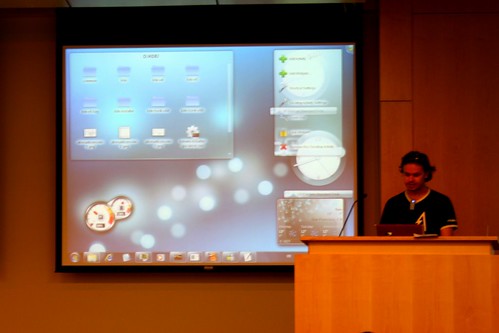
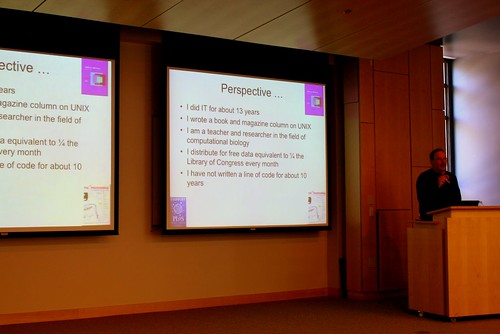
Prof Bourne on Open Access to Data

The keynote was from Professor Bourne, he had a presentation about open access to data, in particular in the field of science (in his example, pharmaceutical sciences), such as the initiatives with protein databank, Public Library of Science, SciVee. I fully agree with his opinions in this matter, especially since they resemble some of my observations when I was doing my graduate research years ago. In particular, "publish or perish" could potentially destroy the sharing spirit of researches. I do believe that competition is good, but I also do strongly believe that science is about sharing.

I hope more people will show up tomorrow. The sunset here is so fantastic, you just have to experience it yourself.

(almost) sunset at Lake Miramar

To be continued (to day 2).

Wednesday, December 30, 2009

"i" for innovate

As I have hinted before, somehow I aimed to move to some sunny place in California. Well, lucky as we could be, after days of experiencing the transient stage (with tons of good and bad experiences, what a roller-coaster), we slowly settle in San Diego, (arguably) a beautiful place to live. The proof is the following picture, basically I can enjoy watching sunset from our balcony every day when the weather permits (it does usually).

sunset from the balcony

Few weeks ago, I started a new position within Qualcomm Innovation Center Inc., specifically in the new Web Technologies team. This center is a wholly-owned subsidiary of Qualcomm, one of the top 10 semiconductor sales leaders last year. The official party line of Qualcomm Innovation Center is best understood by what our president, Rob Chandhok, has expressed once: focus on such important open source initiatives as Linux and Webkit, and on open source operating systems such as Symbian, Android and Chrome.

Qualcomm

Of course, faithful followers of my blog can quickly point out that this whole thing is just a cover-up for the real motive: the strong desire to live in a perfect symmetry :)

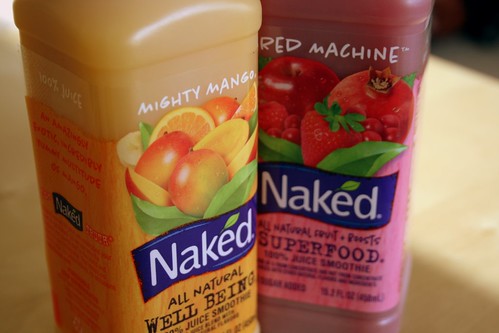
the best juice on earth

In addition, to convince you that the alignment of the planet has been planned for this, surely you know (perfectly) where the upcoming Camp KDE will be held?

See you in 2 weeks. Happy 0x7da!

Saturday, November 28, 2009

putu, kelepon, terang bulan

While enjoying this vacation, I managed to steal few hours to do some fun coding. Nothing spectacular, but it yielded something I will surely share in the near future. However, since I am still in the mood of bombing the planet again, here is another post with food pictures.

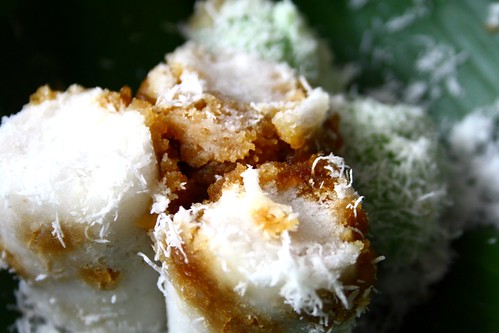
Something else we were glad to taste during our extremely short visit to Bandung were Putu and Kelepon, typically sold at the price of 1 EUR for 25 pieces. They are basically rice cake filled with palm sugar and served with grated coconut. Putu is steamed, while kelepon is boiled. The latter is also colored using pandan leaves.

putu and kelepon

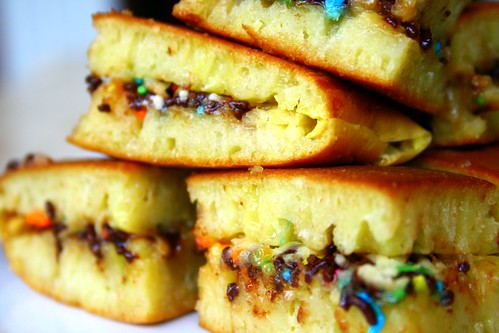
While sampling culinary specialties means that we do not cook quite often, when the opportunity presents itself, it is of course a good feeling to eat something home-made once a while. Here is one: Terang Bulan (literally: bright moon). It is some sort of pancake, very similar to Martabak except Terang Bulan is filled with sugar, sprinkles, condensed milk, cheese, and the likes. Hence, it is also known as Martabak Manis (literally: sweet Martabak), a term that is somehow I dislike (because language-wise it is unnecessary as there exists a good name for that and thus it extends and pollutes the meaning of Martabak with a very weak reason).

The recipe? Check what this lady has posted. Terang Bulan is sweet and healthy (reduce the amount of sugar if in doubt), it makes for a good snack in the afternoon.

Home-made Terang Bulan

Last but not least: Eid Mubarak to everyone!

Tuesday, November 24, 2009

parijs van java

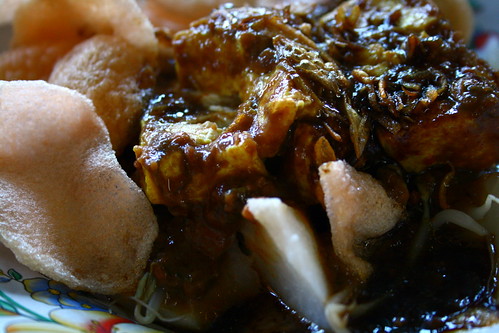
Somehow the wind finally leads me to Bandung, the place where I spent years studying at ITB. While still trying to absorb all the deja-vu sensations (last time I was here, when I left the place, was 6 years ago!), nothing beats having breakfast (and potentially also lunch and dinner later on) in one of those food stalls. Since I promised to write about my culinary excitement, here is one to pollute the planets (the aggregated blogs, not our blue marble): Kupat Tahu. Essentially it is fried tofu, bean sprouts, and lontong (compressed rice) served with peanut sauce and some crackers. That makes it for a good breakfast.

kupat tahu bandung

I will be in Bandung today and tomorrow, mostly just around the university. If you are around and want to have a chat, feel free to drop me an email!

Wednesday, November 04, 2009

english vs indonesian

One thing which recently made it into my reverse-culture-shock impact list is the widespread use of incomprehensible (read: broken), mixed-language expressions, potentially due to many reasons (to name a few: innocent show-off, following the mainstream, or just trying to look more "educated"). It starts with an easy one, like denoting the printer cartridge types as "black" and "color", i.e. in English, although we have good Indonesian words for that ("hitam" and "warna", in case you can't recall). The worse part is yet to come, it kills me when someone starts to sprinkle English words in an otherwise perfect sentence, e.g. "tapi you mesti ngajak aku to follow your, ehm [can't find the English words], kegiatan, which is sebenarnya quite interesting". This wonderful fragment is ridiculously non-sense for both foreigners who never learned Indonesian and for my fellow countrymen who do not know English at all.

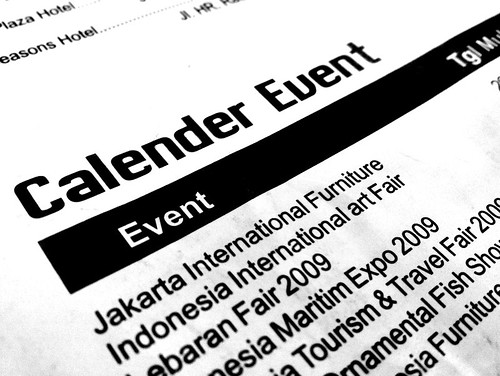
Of course it won't surprise you if I say that you can easily find flyers and other promotion materials exactly using the same pattern. Just today we found a state-sponsored, free Shopping & Travelling Guide booklet featuring dozens of pages with English headings. Again, the contents are written in Indonesian. This leads to a number of striking typos and mistakes, one of which is shown here:

the typical typo

I have nothing against foreign languages (I have my share by learning few of them), but I also still love my wonderful mother tongue, Bahasa Indonesia.